-1.png)
Key takeaways
- Google review software solves different operating problems, from simple manual management and request automation to monitoring, local SEO, multi-location governance, and connected service-feedback workflows.
- Dedicated software is needed when review volume, ownership, triggers, attribution, response approvals, or location complexity exceed what native tools can handle reliably.
- Feature count alone doesn't tell if software fits the workflow. Compare request triggers, response ownership, AI publishing rules, attribution, governance, feedback loops, and total operating cost.
- Review requests should follow genuine customer interactions and avoid incentives, pressure, prescribed content, or selective positive solicitation.
- AI works best when it speeds up routine responses without obscuring which lower-rated or sensitive cases require a person.
A missed Google review can expose a workflow problem that marketing alone can’t fix.
It may mean nobody owns the review inbox, while requests depend on someone remembering to send a link after every completed job. Or a service complaint might never reach the person who can resolve it. Praise for an employee can easily disappear before it reaches the people responsible for follow-up or recognition.
The right software for managing reviews gives that work a dependable trigger, clear ownership, response rules, and useful context. Some solutions specifically focus on requesting and replying to reviews. Others add customer messaging, local-search tools, multi-location governance, surveys, service-system integrations, or employee attribution. How to choose software to manage your Google reviews depends on several key factors, which are outlined in this article.
Do you need dedicated Google review management software?
Many businesses can benefit from Google Review software. Google review software helps verified businesses read and reply to reviews, share a review link or QR code, and report content that appears to violate Google policy. That covers the essentials for a straightforward process with clear ownership.
For businesses with low review volume, one person owns replies, and requests can be sent manually, review management software might be overkill.
Dedicated software becomes necessary when requests are inconsistent, response ownership is unclear, or several locations require shared standards. It also helps when customer context is fragmented across systems, lower-rated reviews require approval or escalation, attribution must connect customers, locations, or employees, or leaders need stronger reporting.
Native tools may also be too limited when teams need surveys, service-recovery workflows, employee attribution, or operational context from the system where the work happened. In those cases, an additional review management platform can reduce manual work and keep the review process connected to the systems where the customer experience began.
Google review management software comparison
|
Software |
Best fit |
Pricing |
Check before buying |
|
Google Business Profile |
Simple, low-volume manual management |
Free |
Automation, ownership, attribution, and location control |
|
Crewhu |
Service businesses connecting reviews, feedback, attribution, and recognition |
$119/$239/$399 monthly at the displayed five-user base; implementation and employee scaling apply |
Exact trigger, attribution rules, plan, and reporting scope |
|
NiceJob |
Lightweight local-service request automation |
$75/$125 monthly; no contract |
Trigger event, timing, routing, and location controls |
|
Podium |
Texting and shared-inbox review workflows |
Custom quote; TrustRadius reports $249–$599 monthly |
Included messaging, review, AI, integrations, and contract scope |
|
ReviewTrackers |
Monitoring, alerts, responses, and analytics |
Custom, location-based; G2 reports from $89 per location monthly |
Core plan, add-ons, permissions, source coverage, and reporting |
|
BrightLocal |
Reviews managed with local SEO and listings |
Grow: $59–$119 monthly for 1–10 locations |
Review-workflow depth, add-ons, and location scaling |
|
GatherUp |
Surveys, NPS, feedback, and review requests |
$99 monthly for one location; $60 per location for 2–10; add-ons apply |
Message use, survey flow, integrations, and growth cost |
|
Birdeye |
Broad multi-location reputation operations |
Custom quote; TrustRadius reports $299–$399 monthly for listed plans |
Modules, implementation, permissions, and total cost |
|
Reviewflowz |
Integration-led monitoring and automation |
$50/$80 per location monthly; Enterprise custom; usage charges apply |
Connector events, campaign usage, ownership, and reporting scope |
Note: Pricing and plan details checked July 22, 2026. Official list prices are shown where published. For products without a public list price, the table includes a clearly attributed third-party benchmark. Final pricing will depend on the provider’s proposal. Locations, users or employees, usage, add-ons, implementation, and contract terms can change total cost.
How we compared the software options
We used current product, help, and pricing pages to confirm capabilities and commercial details, then compared the options using criteria from request triggers, response controls, and attribution to multi-location needs, feedback workflows, pricing, and implementation. User feedback also helped uncover recurring setup and support questions.
1. Crewhu: Best when reviews need to feed the service operation
How it works: Crewhu Echo connects to Google Business Profile, imports Google reviews, and gives teams one place to monitor and reply to them. The dashboard includes current and historical review views, removed-review history, location switching, rating distribution, review volume over time, and the review list.
Reviews can be matched to contacts, companies, and employees manually or automatically. Administrators can choose Conservative, Balanced, or Aggressive match-confidence settings, while Retroactive Auto-Match can process eligible older reviews without replacing existing attribution.
Crewhu’s two AI response modes support different control paths. Suggestion Mode drafts a reply for human review. Auto-Response Mode can publish replies at or above a configured rating threshold while lower-rated reviews remain pending for manual confirmation. Tone and keyword controls guide the response style.
The workflow begins with customer feedback. Crewhu supports resolved, reply, and signature surveys, configurable post-survey links to Google and other review platforms, request-cadence controls, and custom survey snippets for unlisted PSA or ticketing systems. Supported integrations can carry service context, trigger notifications, and write survey information back to the service system.
Once a review is matched, the signal can support employee recognition, badges, Crewcoins, website review widgets, reputation-driver reporting, and scheduled reports. Matching a review to the customer, company, or employee gives the team clearer context for follow-up and recognition.
Pricing: Crewhu pricing offers multiple plans, with Listen at $119 per month, Recognize at $239, and Grow at $399 for five users. Implementation fees are $300, $600, and $1,000, respectively. Crewhu doesn't require contracts, and pricing scales with the max number of active employees.
What to test in a demo: Start with one real service event and follow it through the survey trigger, request cadence, review, AI rule, matching, recovery path, recognition, and reporting.
2. NiceJob: Best for lightweight local-service automation
How it works: NiceJob is a practical choice for local-service businesses that need automated review requests and follow-up without adopting a large reputation suite. Its Reviews plan includes email and SMS requests, reminders, personalization, review monitoring, widgets, integrations, and AI-assisted replies. Pro adds referral and repeat-business functions.
The trigger that starts the request depends on the connected service or transaction system, so a completed job, paid invoice, or another status may produce different behavior.
NiceJob also offers Feedback Routing: After customers rate their experience, the next screen prioritizes a public review for scores above the chosen threshold and private feedback for lower scores. Both options remain available to every customer, according to NiceJob.
Pricing: NiceJob’s current plans are $75 per month for Reviews and $125 for Pro, with a 14-day trial and no contract.
What to test in a demo: Run a real completed job through the system. Check the trigger, timing, reminder sequence, routing screen, AI reply settings, export options, and multi-location controls.
3. Podium: Best for messaging-heavy teams
How it works: Podium suits businesses that already use texting as a primary customer channel. Its review tools are part of a broader customer communication platform that also includes a shared inbox, contact records, team collaboration, and scheduled messaging.
A review invitation can follow the same channel used for appointment reminders, estimates, service updates, and payments. Using the same channel reduces tool switching and clarifies ownership when one team handles both conversations and reviews.
Podium is most useful when the inbox and messaging layer solve broader communication problems. A business that needs only a review link and reminder sequence may not use enough of the platform to justify the broader package.
Pricing: Podium doesn't publish a standard public price and instead asks buyers to request a tailored quote. According to TrustRadius though, current listed benchmarks are $249 per month for Essentials, $409 for Standard, and $599 for Professional. The final Podium proposal depends on the package and business requirements.
What to test in a demo: Ask Podium to show a review invitation inside the exact inbox and texting workflow employees would use. Confirm assignment, escalation, automation, integrations, notification behavior, and the complete contract.
4. ReviewTrackers: Best for monitoring and response operations
How it works: ReviewTrackers is built for organizations whose core need is to collect review activity, alert the right people, coordinate responses, and analyze performance across locations.
Its plans cover review monitoring, alerts, request campaigns, response workflows, dashboards, and customer-experience analytics. Listings, local search rank tracking, managed services, white-label services, employer-brand monitoring, and app-store monitoring may sit outside the core review package.
This structure excels when review operations are the central requirement. But its advantage narrows when the need begins with ticket-triggered feedback, employee recognition, or a shared customer-messaging inbox.
Pricing: ReviewTrackers says its pricing is location-based and tailored to the business. According to G2, pricing starts at $89 per location per month. The official site states that plans are priced per location and paid annually, while the final proposal depends on location count, plan, and add-ons.
What to test in a demo: Inspect review source coverage, alert speed, assignment, escalation, location permissions, AI approval, reporting exports, and every proposed add-on.
5. BrightLocal: Best when reviews sit inside local SEO
How it works: BrightLocal suits businesses and agencies that manage reviews together with local rankings, listings, citations, and Google Business Profile work.
Its Grow plan includes review monitoring and response tools, email and SMS campaigns, in-store request options, and website widgets. These functions sit inside a broader local-marketing toolkit, so the package extends beyond review management.
That combination can be efficient when the same team owns local visibility and customer reviews. It’s less suitable when the priority is service-ticket context, employee attribution, a deep recovery workflow, or enterprise reputation governance. BrightLocal can support local-search work but can’t guarantee rankings.
Pricing: BrightLocal publishes location-based pricing for Grow, the plan that includes its review-management tools. Grow costs $65 per month for one location, $87 for 2–5, and $131 for 6–10. Annual billing is approximately 25% lower.
What to test in a demo: Separate the review functions included in the proposed package from local-search tools the team may not need. Check reporting, location scaling, campaign controls, and the response workflow.
6. GatherUp: Best for surveys, NPS, and feedback automation
How it works: GatherUp is designed for businesses that want structured customer feedback close to the review-request process.
The platform supports email and SMS requests, surveys, NPS, review monitoring, notifications, AI-assisted replies, reporting, widgets, and integrations through API, Zapier, and webhooks. This makes it a good choice for teams that value survey design and feedback analysis as much as public review volume.
Review the survey-to-review journey closely. Private feedback can support learning and recovery. It shouldn't become a mechanism for hiding the public-review option from dissatisfied customers.
Pricing: GatherUp pricing is $99 per month for one location and $60 per location per month for 2–10 locations. Annual billing reduces the listed amount by 20%, although message allowances apply. Listings Hub costs $40 per location per month, and agency pricing is tailored to the account.
What to test in a demo: Use the expected location count and message volume. Follow the full journey from survey invitation to feedback handling, public-review option, notification, reply, and reporting.
7. Birdeye: Best for broad multi-location reputation management
How it works: Birdeye is the broad-suite option for organizations that want reviews managed alongside listings, social activity and messaging, search, insights, and other reputation functions.
Its review capabilities include generation, monitoring, alerts, response workflows, AI assistance, assignment, and reporting. That breadth can reduce fragmentation for distributed organizations that would otherwise combine several products.
The same breadth can also add implementation work. Buyers should define the required modules before comparing proposals and confirm permissions, templates, onboarding, migration, integrations, and reporting scope.
Pricing: Birdeye’s official pricing configurator creates a tailored proposal based on the products and number of locations deployed. According to TrustRadius, current listed benchmarks are $299 per month for Standard and $399 for Professional, while Premium remains custom-priced. The Birdeye proposal controls the final cost.
What to test in a demo: Ask for a location-by-location implementation plan that identifies the included modules, user roles, response ownership, integrations, rollout work, and the total cost of ownership.
8. Reviewflowz: Best for integration-led automation
How it works: Reviewflowz emphasizes review monitoring, alerts, Slack visibility, automated campaigns and AI replies, and team-level attribution or leaderboards.
That approach works well when review activity should appear inside tools employees already use. A new review can move directly into an operational channel so it doesn't sit in a separate dashboard until someone checks it. Supported integrations can also trigger review campaigns after defined business events.
Reviewflowz is strongest for integrations, alerts, and automation. Teams that also need surveys, structured recovery workflows, or employee recognition may need a second system.
Pricing: Reviewflowz pricing is $50 per location per month for Pro and $80 for Premium, with tailored Enterprise pricing available. Campaign usage charges apply, and the Premium plan adds functions that include AI auto-posting.
What to test in a demo: Test the exact connector and event the business intends to use. Confirm what starts the request, where the review appears, who owns it, which replies may post automatically, and how location and campaign charges are calculated.
Three other options worth considering
Reputation: Enterprise governance and actions
Reputation stands out when a large organization wants reviews, surveys, listings, social management, analytics, and operational actions in one enterprise platform. Pricing starts at $80 per location per month for Rep Core, $115 for Core + Pulse, and $150 for Core + Surveys. Organizations with 125 or more locations receive tailored pricing, with Actions & Ticketing as an add-on. Implementation and optional modules still need to be included in the total proposal.
Grade.us: Agency and white-label programs
Grade.us is built for agencies, resellers, and white-label review programs. Its plans list $99 per month for a single location and $60 per location per month for multi-location use, with a separate agency plan for 10 or more seats. It’s a strong option when one team manages review activity for several clients through an agency or reseller model.
Reviewshake: Lower-cost review management
Reviewshake offers a lower-cost route into review requests, monitoring, reporting, widgets, integrations, and AI-related functions. Current pricing is $29 per month for Starter, $59 for Growth, and $99 for Ultimate, with separate agency plans available. It’s worth a look for buyers who prioritize transparent entry pricing over advanced governance or a service-feedback operating layer.
How to choose the right Google review software
A longer feature list doesn't guarantee a product will make review work more reliable. Start with the operating failure you need to fix instead.
Identify the event that should start the request
A review link sent manually after a conversation works differently from a request triggered by a completed job, closed ticket, paid invoice, appointment, or CRM status.
Ask:
- What event begins the workflow?
- Does the integration expose that event?
- How long after the event is the request sent?
- Can staff review the campaign before it goes live?
- What stops reminders after the customer responds?
Trigger quality often outweighs the number of integrations shown on a product page. A service-system connection helps only if it can use the status and data the process requires. A completed-job trigger starts the process, but message timing, wording, and QR code placement still shape how natural the request feels.
Assign ownership before adding automation
A fast alert still fails if nobody owns the response.
Define who receives a new review, who handles routine replies, who investigates a complaint, and what happens when the first owner doesn't act. Multi-location teams should also decide whether responses belong to each location, a central team, or both.
Look for assignment, escalation, permissions, templates, and reporting that reflect this operating model. A shared dashboard leaves the problem unresolved when responsibility remains unclear.
Separate drafting, approval, publishing, and escalation
“AI responses” can describe several different control paths. AI may draft a reply, suggest edits, publish automatically, or route a case according to a rating threshold. Those are all separate decisions. The software should make clear which reviews it handles automatically, which remain pending, who can change the rules, and how exceptions are escalated.
Routine acknowledgments are suitable for automatic publishing within defined rules. Lower-rated reviews, privacy concerns, billing disputes, safety issues, legal allegations, and strategic customer relationships may need investigation or a more senior owner.
Decide what context the team needs
Attribution may connect a review to a location, customer, company, employee, team, or service record. Ask how the match is made. Check whether it comes directly from an integration, is performed manually, uses confidence settings, or is inferred from available data. Employee attribution gives managers useful context for follow-up and recognition.
The same principle applies to reporting. Decide whether the team needs rating and volume trends, unresolved work, employee or location views, exports, scheduled reports, or enterprise roll-ups.
Choose between a review tool and a wider operating system
Some products focus on review requests, alerts, and replies. Others include messaging, local SEO, listings, surveys, service recovery, employee recognition, or enterprise governance.
Broader platforms prove their value when those connected functions solve real problems. Otherwise, it just increases implementation work, administration, and cost.
Service businesses specifically need to ask whether a public review should remain an isolated marketing asset or become an operating signal. When a review stays connected to feedback and employee attribution, teams can investigate service problems, follow up with customers, and recognize strong work without losing the original context.
Compare total operating cost
Subscription price is only one part of the commercial model. The total cost of ownership is higher, so you need to add in all potential expenses for a more accurate estimate. Consider:
- Location charges
- Users or active employees
- Message and campaign usage
- Selected modules
- Implementation fees
- Integration work
- Migration and training
- Contract and renewal terms
- Internal administration
- Switching costs
A cheaper product can still leave you with substantial manual work, while more comprehensive platforms will cost more than their practical value if most modules go unused. Use reported starting prices to establish an initial budget, then compare the provider’s proposal line by line.
Test each product against the real workflow
Use the business’s own systems, data, and operating conditions in the demonstration. Ask each provider to show:
- The exact event that begins the workflow
- The message or request the customer receives
- What happens after a routine positive review
- How a lower-rated or sensitive review is handled
- Assignment, escalation, and approval
- AI drafting and publishing rules
- Customer, employee, and location context
- Reporting, exports, and scheduled delivery
- The complete commercial proposal
The test should show whether the software closes the gap. Looking at features in a menu can’t answer that.
Policy-safe requests, AI responses, and review removal
Google allows businesses to ask customers for reviews and to share review links or QR codes. But it prohibits fake engagement, incentives, pressure, requests for prescribed content, rating manipulation, and selectively soliciting customers expected to leave positive reviews.
Play it safe and send review invitations after genuine customer interactions. Use neutral language in the ask, and don’t use private feedback as a filter that hides the public-review option from dissatisfied customers. Check the product’s default configuration before assuming it meets that standard.
Automation needs its own safeguards. Routine acknowledgments may be published under defined rules, while privacy concerns, disputes, safety issues, serious service failures, and other sensitive cases need a clearly assigned owner with authority to investigate and act.
Review-removal promises need similar care. Google lets businesses report reviews that violate its policies, but legitimate negative feedback isn’t removable simply because the business disagrees with it. The better response is to investigate, reply professionally, and address the underlying service issue.
When reviews need to return to service operations
A public review is more useful when it doesn’t end in a marketing inbox. Keeping customer, employee, location, and service context alongside the review helps the team investigate problems, follow up with customers, and recognize strong work without rebuilding the story across several systems.
Crewhu is built for this connected workflow. It brings Google review handling together with customer feedback, employee attribution, recognition, and reporting. The product keeps that context visible so managers and service teams can decide what follow-up the situation needs.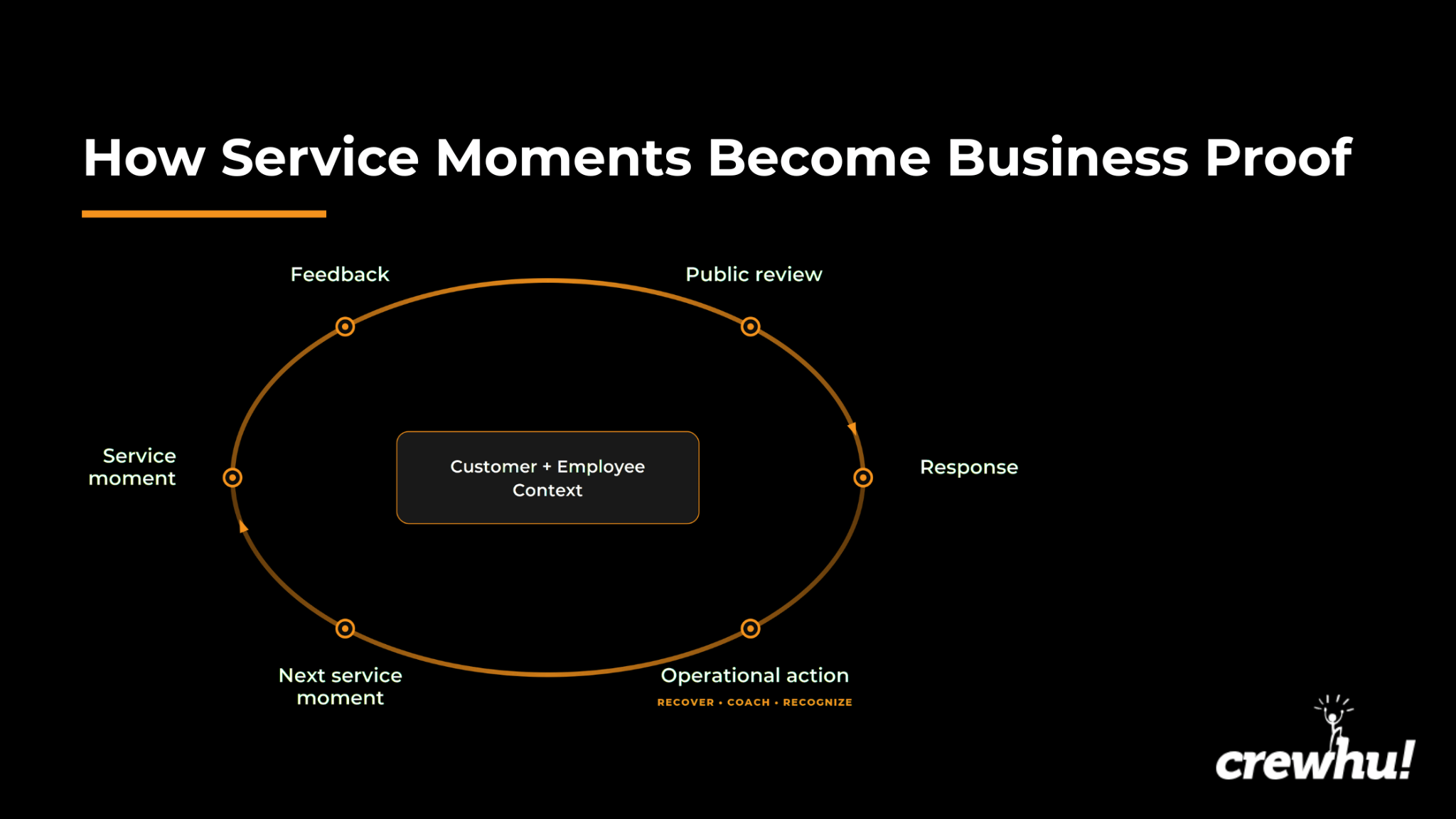
Conclusion
Every service business needs reviews, but the demands don’t stop at just generating them. Google Business Profile can be enough for simple manual work, but larger, complex teams need more advanced features like request automation, monitoring, local SEO, multi-location governance, or stronger attribution and reporting.
Compare each option on your candidate list against the trigger, response owner, preserved context, and full operating cost. Then use the same review scenario in every demo you sign up for so the differences are easier to see.
For service businesses that need Google reviews to support follow-up, recognition, and reporting, consider choosing Crewhu. Book a Crewhu demo, test that workflow against the systems your team already uses, and see how a unified platform really shines.
FAQs
What is the best software for managing Google reviews?
The best option matches the workflow problem the team has to solve. Some teams need request automation or customer messaging, while others want monitoring, local search support, multi-location controls, or employee attribution. Service businesses may also need customer feedback, recognition, and reporting to sit in the same workflow as review handling. Compare those operating demands instead of treating a long feature list as evidence of a good fit.
Is Google Business Profile enough to manage reviews?
Yes, when review volume is low, one person owns the process, and requests can be sent manually. Google Business Profile lets verified businesses read and reply to reviews, share a review link or QR code, and report content that appears to violate policy. Dedicated software is needed when teams require automated triggers, integrations, attribution, advanced reporting, or stronger multi-location controls.
Should businesses use AI to respond to Google reviews?
AI can draft or publish routine replies when its rules are clear. The important questions to ask first are which reviews qualify for automation, which remain pending, who can change the rules, and who handles sensitive exceptions. Lower-rated reviews, disputes, privacy issues, and serious service failures often need investigation or relationship recovery.
Can software request or remove Google reviews?
Yes. Software can send links, reminders, and system-triggered requests, but the request still needs to follow a genuine interaction and remain neutral. Incentives, pressure, content steering, and selective positive solicitation remain off limits. Software can report policy violations, but it can’t guarantee removal of legitimate criticism.