
Key Takeaways
- For routine post-service CSAT questionnaires, ask one question and let customers add reason tags or a comment if they want.
- Don't make customers repeat details you already have in the ticket, CRM, or PSA. Save their attention for the parts only they can answer.
- Keep service feedback and relationship feedback separate. One tells you how a specific interaction went, while the other reveals what it's like to be your client.
- Ask only when the customer can actually give their opinion on what you're measuring. Interaction feedback can come right away, but reliability, project usefulness, and value should wait until they've used the fix or deliverable or had a chance to see the expected result.
- A large reply count can fool you. Check how many different customers or accounts answered, who's missing, and whether the same few people keep showing up. Then see whether the same complaint, compliment, or rating difference reappear in another period, customer group, or service type.
Finding customer survey questions is as easy as a Google search. Choosing the few worth a client's time, however, takes more thought.
Before you add one to a questionnaire, ask what you'd actually do with the answer. A low score might trigger a follow-up. Repeated complaints about unclear updates might tell you the communication process needs work. If the response wouldn't change anything, the question is just taking up space. And if the detail is already in the ticket, CRM, or PSA, don't make the customer repeat it.
A quick-start post-service questionnaire you can use today
Need something you can use today? Start with one overall rating for the service interaction. Add optional reason tags and a comment field so customers can explain their choice if they want. A single question is less of a demand on customers’ time so they’re more inclined to answer it.
|
How satisfied were you with the service you received for this request? * ◯ Satisfied ◯ Neutral ◯ Dissatisfied Reason tags (optional): ☐ Response Time ☐ Helpfulness ☐ Updates ☐ Resolution Comment (optional): What else should we know about your experience? |
*Required
The rating captures the customer's overall impression of your business. If they choose a tag or leave a comment, you get a clue about what shaped it. Compare that feedback to the ticket or job record to see what deserves a closer look.
What should you ask in a customer satisfaction questionnaire?
Focus on the things only the customer can tell you, such as how the service went, whether the issue was resolved, how easy it was to get help, and what drove their rating. Don't throw every possible topic into the questionnaire by default. Choose any additions based on what you're actually trying to learn or improve. If poor updates are a recurring problem, ask about communication. If you need to know whether the service holds up after repeated use, ask about reliability.
Value and trust belong in broader relationship feedback, after the customer has seen enough of your service to judge whether it's delivering what they need and whether your team follows through.
Once you know what you're trying to learn, the table below fills in the rest. It shows what to ask, when the customer can answer it well, and what your team can do with the response.
|
What you want to know |
Question and response |
When to ask |
What you can do with the answer |
|---|---|---|---|
|
Overall satisfaction |
Overall, how satisfied or dissatisfied are you with the service you received? |
Right after the interaction, once they can rate the experience |
Follow up on low ratings |
|
Resolution |
Was your request fully resolved? |
Once they know whether the issue is fixed |
Catch work that isn't fully finished |
|
Effort |
How easy or difficult was it to get the help you needed? |
After they've gone through the support process |
Fix a step that's making it harder to get help |
|
Communication |
How clear were the updates you received? |
Once they've had enough updates to tell whether your communication was clear |
Improve when and how you update customers |
|
Reliability |
How satisfied are you with the reliability of the service? |
After they've used the service enough to rate its reliability |
See where the service is letting customers down |
|
Expertise |
How confident are you in our team's expertise? |
When trust in the team's expertise affects the relationship |
Discover where customers are losing confidence in the team |
|
Value/Results |
How satisfied are you with the results over the past [review period]? |
After the result has had time to show up |
Reset priorities or follow up on results |
|
Trust |
How confident are you that we will follow through on what we agreed? |
During a client relationship review |
Catch promises or expectations that feel off |
|
Future priority |
What should we improve or prioritize over the next [review period]? |
Before the next review or planning cycle |
Set the next improvement priorities |
|
Reason/Comment |
What made you pick that rating? |
When you need to know what drove the score |
Catch recurring reasons you didn't list up front |
Ask one thing at a time. "How satisfied were you with our speed and communication?" is hard to make sense of if the customer liked one but not the other. Pew Research Center recommends keeping questions focused on a single concept and making sure the response choices don't overlap.
Don't make the customer type out facts you already have. Keep response time, issue type, assigned team, channel, transfers, and reopenings in the service record. Use the questionnaire to gauge things your systems can't know on their own, like:
- How well did we solve the problem?
- How easy was it to get help?
- Were the updates clear?
- Did the team inspire confidence?
- Did the service deliver the result you expected?
- What drove the rating you gave us?
You don’t want to keep it too broad though, as a catch-all satisfaction score can blur different problems. According to survey data from JD Power, 12% of repairs weren't completed correctly on the first visit, and 4 of the 10 most influential KPIs were communication-related. A customer can love the technician and still hate the updates. Your questions need to accommodate that nuance.
How do you decide which questions make the cut?
Every question needs a reason to be there. Start with the information gap. What do you still need from the customer? When can they answer it? What will you do with the result?
Mikkel Korntved, CEO and senior partner at Loyalty Group, describes a practical way to keep that focus: Use the customer and service data you already have, then show a follow-up question only when an earlier answer makes it logical to include.
Learn More:
Put the overall rating near the top, then drill down into specific parts of the experience. If the customer has just rated communication, speed, or effort, that topic is top of mind for them and can tug the broader rating in that direction. Once you have the overall view, use more specific questions to see what's driving it.

One rough ticket handling doesn't tell you how the client feels about the whole relationship, and vice versa. Tickets can look fine while the client has doubts about value, priorities, or trust. Those are different feedback jobs, so give them separate questionnaires.
Customer satisfaction questionnaires you can adapt to your clientele
Quick two-question pulse check
Use this after routine service interactions when the ticket or client record already has the nuts and bolts.
|
1. Overall, how satisfied or dissatisfied are you with the service you received for this request? * ◯ Very satisfied ◯ Satisfied ◯ Neither satisfied nor dissatisfied ◯ Dissatisfied ◯ Very dissatisfied |
|
2. What made you pick that rating? ____________________________________________________________ |
*Required
Keep the customer’s response tied to their ticket, job, or client record so you can see who answered, what they rated, and which team or service was involved.
Following up on a low CSAT rating
A low rating deserves investigation. Look at any tags or comments left alongside the service record, then ask about any part of the experience that's still unclear.
Say a customer gives a low rating and picks the “Resolution” tag. The manager looks at the ticket and asks, “Is the issue you contacted us about still happening?” If it is, the team can address the unresolved work. If it isn't, the manager can ask what else made the experience disappointing.
For complaints about updates, ask what information the customer was waiting for. If the problem keeps returning, find out what happened when they used the service again.
B2B relationship questionnaire
Use this relationship questionnaire when you want to better grasp the client relationship. Give them a review period they can recognize, such as "the past six months" or "since our last review."
|
1. Over the past [review period], how satisfied are you with our service overall? * ◯ Very satisfied ◯ Satisfied ◯ Neither satisfied nor dissatisfied ◯ Dissatisfied ◯ Very dissatisfied |
|
2. How reliable has our service been over the past [review period]? * ◯ Very reliable ◯ Reliable ◯ Neither reliable nor unreliable ◯ Unreliable ◯ Very unreliable |
|
3. How well has our service delivered the results you expected over the past [review period]? * ◯ Extremely well ◯ Very well ◯ Moderately well ◯ Slightly well ◯ Not at all well ◯ Too soon to tell ◯ N/A |
|
4. How confident are you in our team's expertise? * ◯ Extremely confident ◯ Very confident ◯ Moderately confident ◯ Slightly confident ◯ Not at all confident |
|
5. How clear have our updates been over the past [review period]? * ◯ Extremely clear ◯ Very clear ◯ Moderately clear ◯ Slightly clear ◯ Not at all clear |
|
6. How easy is it to work with us? * ◯ Very easy ◯ Easy ◯ Neither easy nor difficult ◯ Difficult ◯ Very difficult |
|
7. How satisfied are you with the value you receive from our service? * ◯ Very satisfied ◯ Satisfied ◯ Neither satisfied nor dissatisfied ◯ Dissatisfied ◯ Very dissatisfied ◯ Too soon to tell ◯ N/A |
|
8. How well is our service supporting your business priorities right now? * ◯ Extremely well ◯ Very well ◯ Moderately well ◯ Slightly well ◯ Not at all well ◯ Not sure |
|
9. What should we improve or prioritize over the next [review period]? ____________________________________________________________ |
|
10. What should we keep doing? ____________________________________________________________ |
* Required
Pay attention to who answered and their role in the client relationship. A day-to-day user, technical owner, buyer, and executive sponsor each see a different side of the service. If most replies come from the same person or role, you could miss what the others are seeing.
How many questions should a customer satisfaction questionnaire include?
After a service interaction, a single rating gives you a quick read on customer satisfaction. A B2B relationship questionnaire covers more ground and features 8–10 questions about service reliability, results, and client priorities.
A short questionnaire can still feel like homework when the wording is unclear, every answer needs a paragraph typed out, or half the form doesn't apply to the recipient’s situation. That cuts into your response rate, since industry research has shown that people who feel burdened by a survey are more likely to skip questions or choose "don't know." They’re also more inclined to write less in open-text boxes and show clearer signs of rushing through the form.
When should you ask for customer satisfaction feedback?
The right time depends on what the customer has actually had a chance to observe and judge. They can rate how clear the interaction was or how hard it was to get help as soon as the conversation or service visit ends. But questions about reliability, project usefulness, or value need actual usage before the customer has much to go on.
Match the timing to what you're asking about:
- Live interaction or short service contact: Ask at the end or later the same day about clarity, ease, or the interaction itself.
- Straightforward support issue: Ask after the customer has had a chance to confirm the problem is solved. If the ticket closes before they've tested the fix, wait to ask until after they've tried it.
- Repair or technical change: Ask after the next normal use cycle. A fix put into practice several times a day may be ready for a check-in later that same day. A feature used only during a weekly task or month-end process needs to make it through that task before the customer can say whether or not it held.
- Project or professional service: Ask about communication and handoff when the project wraps. Wait to ask about usability until after the client has put the deliverable through a real workflow. For value, hold off until the result you're trying to improve has had a chance to show up.
If the project was meant to improve month-end reporting, for example, ask after the client has gone through the next month-end close.
- B2B relationship feedback: Send it near a client review or renewal conversation, when value, priorities, and the overall relationship are already on the table.

How can you get more useful replies?
To collect genuinely useful replies, make the request obvious, familiar, and easy to answer for customers. Small choices in the invite can move the needle.
Data published by Survey Research Methods even revealed that personalized invitations produced about a 10% lift in survey starts compared with the not-personalized version. A more senior sender and wording that asked for help also increased starts, but by smaller amounts.
Adopt a few simple moves:
- If you're emailing the survey, use a familiar (or at least more recognizable) name in the “From” field, such as your company, service team, or account manager.
- Name the request, job, visit, or client relationship so there's no guessing what they're rating.
- Give the customer one obvious first action, such as clicking the rating that matches their experience.
- If the ticket already has the issue type, response time, channel, and assigned team, don't ask the customer to type them again.
- If you include a comment box for responders to explain a rating, leave it as optional.
- If you make changes based on feedback that customers will notice, such as updating timing, a handoff step, or the way you explain a process, mention it in the next customer update, review, or follow-up email.
For a periodic relationship questionnaire, mention it ahead of time in a client review email, meeting agenda, or regular account update so the request doesn't drop out of nowhere. For a ticket survey, include the ticket or request reference in the subject line and put the one-click rating near the top. The customer should know which interaction they're rating before they open the full questionnaire.
How many survey responses do you need before you act on the results?
There’s no single reply count that tells every business when to act. If several customers who receive the same status emails say the wording is confusing, you could test a clearer version and then roll it back if it doesn’t help. A change that affects every client, such as a new escalation or handoff process, deserves broader evidence. Look for the same issue across different customers or accounts, then see whether it shows up again in another period, team, or service type.
Before you change a process, staffing choice, client plan, or policy based on questionnaire results, check a few things:
- How many usable replies did we get?
- How many different customers or client accounts are behind them?
- Who are we missing?
- Is one customer or client account answering over and over?
- For B2B, which roles replied?
- Does the same complaint, compliment, or rating difference show up again in another period, customer group, service type, or team?
- How costly would it be to get this wrong, and how easy would the change be to undo?
More replies can make the numbers more precise without fixing who's missing, as Pew Research Center spelled out: Increasing an opt-in sample from about 2,000 to 8,000 narrowed the margin of error, but the larger group still showed about the same bias. In other words, more responses tightened the estimate without fixing the underlying representation problem.
One way to avoid this issue is to count unique customers or client accounts alongside total replies. Ten replies from the same customer are still just one person wearing multiple hats. If you only look at reply count, you can mistake repeated feedback from a few customers for broad agreement across your customer base.
For larger B2B clients, count roles as well as people. Forrester notes that complex accounts can have many client contacts, so be deliberate about who’s included and what role each person plays. Otherwise, one vocal contact can end up speaking for the whole account.
How should you analyze the answers?
Read the results two ways: Closed questions show patterns and differences between groups; open comments help explain them. Clean the data first, then decide what one row represents, such as a response, customer, ticket, or client account.
Go beyond the score to find out the “why”
The rating tells you how the client received the service interaction, while the reason or tag points you toward the likely issue. The comment fills in what happened, and the ticket or client data gives you the service facts around it.
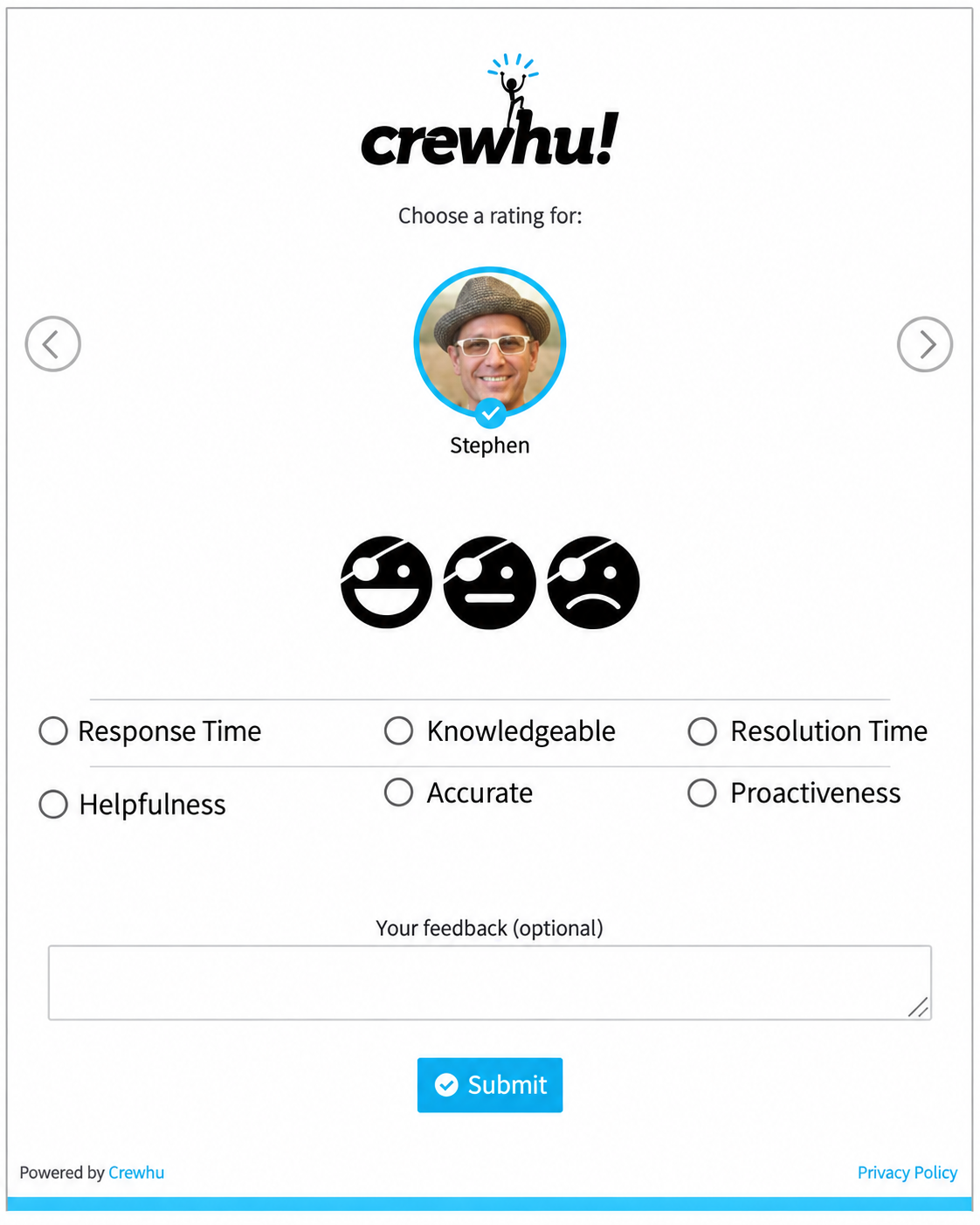 Example of a CSAT questionnaire with rating choices, reason tags, and an optional comment field
A low score tells you something went wrong. A "Resolution Time" tag tells you where to look first. If the comment says the technician was helpful, but the fix took three visits, you know where to dig.
Start with the ratings and other closed answers to see the strongest patterns. Compare the customer groups, service types, teams, or periods that matter. Then categorize comments into recurring themes and keep a few real examples for context. The numbers show which scores or group differences stand out, while the comments help explain what's driving them.
Want the customer's own words before you give them choices? Put the comment box first. Need faster routing and cleaner reporting? Show the reason menu first and leave the comment box underneath.
How Crewhu leverages this questionnaire logic
Crewhu's customer feedback tools keep the questionnaire inside the service workflow. Customers rate the interaction and can select Survey Tags or leave a comment if they want to explain what drove the score.
With a supported integration, the feedback can easily be linked to the ticket or client record.
Put the rating one click away
For ticket-based CSAT, keep the rating right next to the service conversation so the customer can answer in a click or two.
Image Snippet puts the three rating choices directly in the email so the customer clicks a face to start. Text Only shows the choices as text links instead, allowing them to still appear when images are blocked.
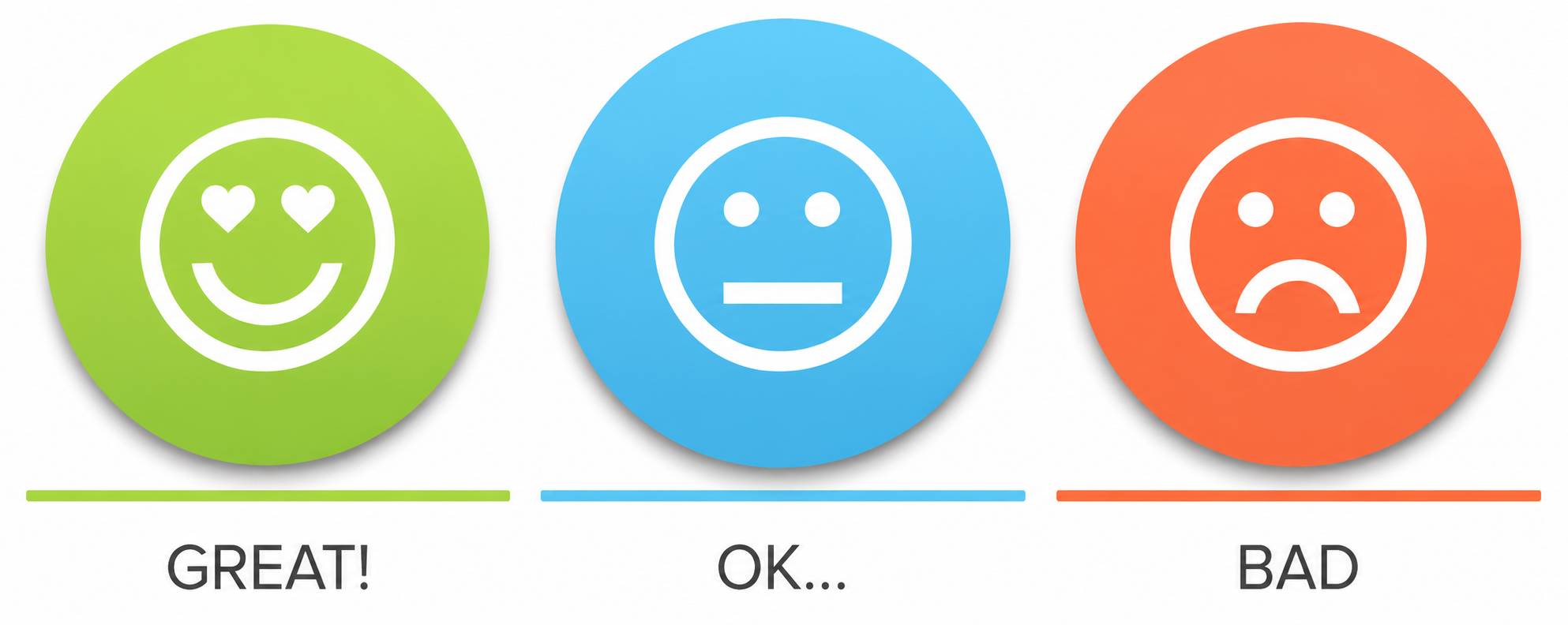 Three-face Image Snippet
Let the customer say what drove the score
After the rating, Survey Tags give the customer a quick way to say what led to their score. Keep the choices plain and specific, with labels like Response Time, Helpfulness, Resolution Time, Accuracy, or Knowledge. Leave room for a comment, then review the tag list once you change how the service is delivered or when comments keep surfacing a reason the current choices don't cover.
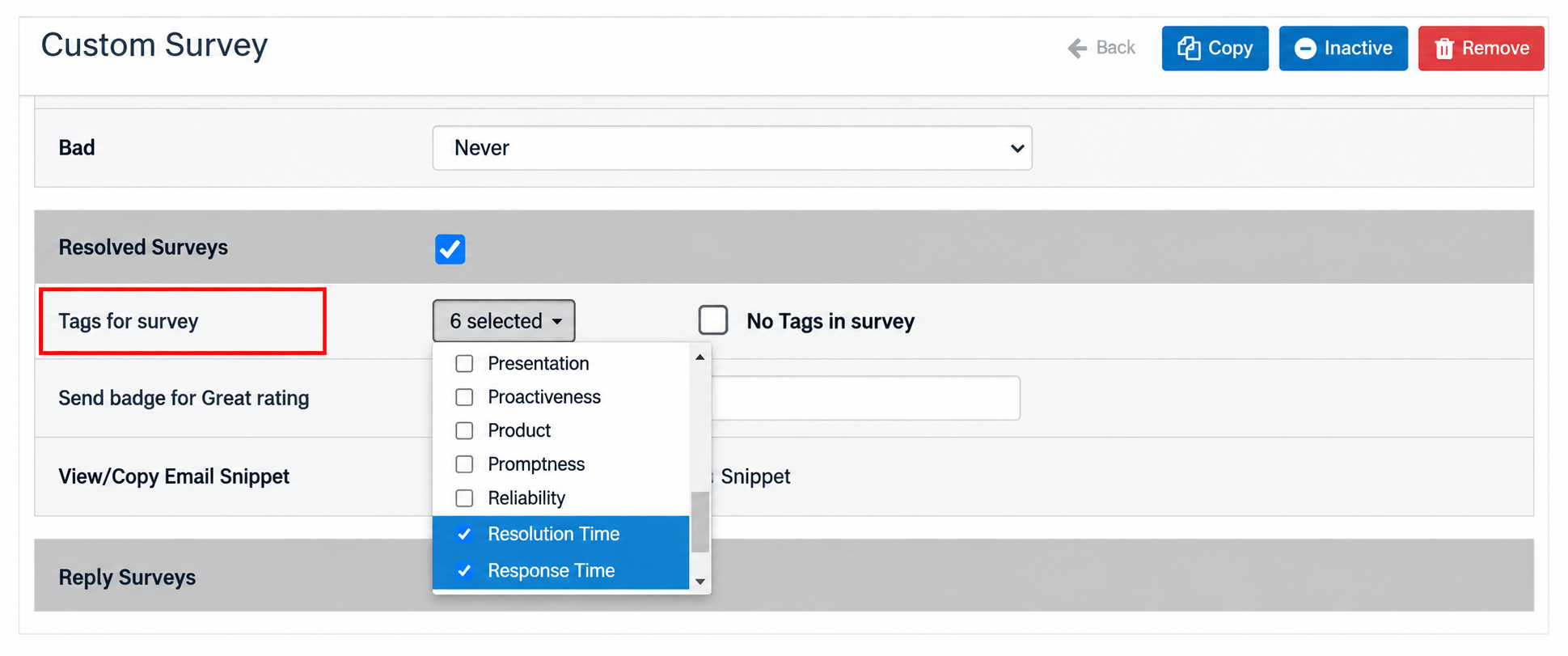 Choosing tags for a Custom CSAT survey
Zoom out from the ticket
When you need the wider client view, Pulse NPS can capture the score, Sentiment Drivers, and written feedback. It also attaches the campaign, company, and contact details to the response.
Before you hit “Send”…
A well-crafted customer satisfaction questionnaire stays focused because every question has a job. Ask customers for the opinions only they can give you, keep service-event feedback separate from relationship feedback, and wait until they've had enough experience to give a valid answer.
When the replies come in, use the rating together with the reason or tag, comment, and service context to understand what sits behind it. And before a big reply count sways you, check how many different customers, accounts, and roles those answers actually represent.
Before your questionnaire goes live, run through these checks:
- What do we need to learn from the customer?
- Do we already have this detail in the ticket, CRM, or PSA?
- Has the customer seen or experienced enough to answer this?
- What would we do differently with this answer?
- Are we asking the right person?
- Is now the right time?
- Are we making the customer do legwork we could handle ourselves?
- When the replies come in, will we know how many different customers or accounts they represent?
Want to see the full setup in action? Book a Crewhu demo and follow the path from the rating and Survey Tags to comments, service context, and relationship feedback.