Key Takeaways
- Choose respondents based on what they can actually assess. The person who requested help isn't always the one relying on the result.
- A survey after one completed request can miss problems in ongoing support. Ask about a defined period to capture the broader service experience.
- Keep a high score in context. Show the scoring method, number of valid ratings, invitation coverage, and response rate so gaps in feedback stay visible.
- A favorable rating doesn't guarantee usable access or the information an employee needs. Ask separately about the support experience and the result.
- After a service change, check whether the team carried it out and what employees experienced afterward.
The IT ticket says “Resolved.” The employee tries the shared drive and still can't get in. How did they rate the support? Could they actually finish the task? The answers point the manager toward different things to investigate.
To measure internal customer satisfaction, choose the service, the people who can judge it, and a clear reporting period. Calculate satisfaction from valid ratings, then read employee comments alongside service records and other evidence of how the work was handled. IT, payroll, procurement, finance, and facilities managers can use that evidence to decide what to fix.
What does internal customer satisfaction measure?
Internal customer satisfaction measures how satisfied employees are with services they receive from other teams in the same organization. The assessment covers one request, such as a payroll correction, or support received over a defined period, such as monthly financial reporting.
Imagine a manager asking HR to correct an employee's pay. The manager can describe how HR handled the request. The employee can check whether the payment is right. If the question is whether the correction worked, the employee is the one to ask, even though the manager made the request.
When to ask for internal service feedback
Ask when employees have had enough experience to judge the part of the service you're measuring.
|
Service situation |
When to ask |
What the employee can judge |
|
One request — shared-drive access or a payroll correction |
After they've tested access or checked the corrected payment |
How support went and whether the result worked |
|
Recurring service — finance or HR support |
After they've used the service over a defined period |
Their experience during that period |
|
Longer process — procurement approval |
After a meaningful approval stage |
Clarity of the next step now. Overall satisfaction after the full service. |
In 2024, Edinburgh HR sent weekly surveys about requests marked resolved the preceding week.
UW–Madison surveyed employees about administrative services in 2022, 2024, and 2026, including finance, HR, IT, and facilities. A finance team can ask about April's support once recipients have used the month's reports for their decisions.
After procurement approval, “Do you know the next step?” can reveal confusion while there's still time to help.
Internal customer satisfaction survey questions
A short internal service survey pairs an overall satisfaction question with a question about the result or an aspect of the support. An optional comment lets employees describe an improvement or explain an obstacle. Naming the service, team and request or period keeps the answers focused on the experience being assessed.
Survey questions after a service request
|
Team that provided the service: [team] Request being rated: [ID and short description] Your answers will be read by [team or role]. [Whether and how the team will contact you about your response.] Select one answer for each of questions 1 and 2. Your written comment is optional. 1. How satisfied were you with the support from [team] for [request]? ☐ 1 — Very dissatisfied ☐ 2 — Dissatisfied ☐ 3 — Neither satisfied nor dissatisfied ☐ 4 — Satisfied ☐ 5 — Very satisfied 2. Did the result let you complete the task you needed to do? ☐ Yes ☐ Partly ☐ No ☐ Not sure 3. What is one thing we could make easier for you? If you selected No or Partly in question 2, use the comment box below to explain what you still need help with. ________________________________________________________________________ ________________________________________________________________________ |
An employee marks the support Satisfied and the result Partly, then writes, “The technician explained the fix, but I can only access one of the two folders I need.” The team now has a specific access problem to check, even though the employee liked the support.
Survey questions about ongoing support
|
Team that provided the service: [team] Service being rated: [service] Period: [start date] to [end date] Your answers will be read by [team or role]. [Whether and how the team will contact you about your response.] Select one answer for each of questions 1 and 2. Your written comment is optional. 1. Thinking about [service] from [start date] to [end date], how satisfied were you with the support from [team]? ☐ 1 — Very dissatisfied ☐ 2 — Dissatisfied ☐ 3 — Neither satisfied nor dissatisfied ☐ 4 — Satisfied ☐ 5 — Very satisfied ☐ I didn’t use this service — end the survey here. 2. How clear were you about the next steps for [service] during that period? ☐ 1 — Not at all clear ☐ 2 — Slightly clear ☐ 3 — Moderately clear ☐ 4 — Mostly clear ☐ 5 — Extremely clear ☐ No relevant interaction / Not applicable 3. What is one change that would make this service easier to use? Optional comment ________________________________________________________________________ ________________________________________________________________________ |
The clarity question suits instructions or approvals. For recurring finance reports, use “Did the reports contain the information you needed for [decision]?” as question 2. The four choices are Yes, Partly, No, and Not sure. Retain the overall satisfaction question to assess satisfaction separately from the report’s usefulness.
When adapting the survey, ask about clarity and timeliness separately. An employee could understand an explanation perfectly and receive it too late. Asking about each issue separately makes it easier to tell which one the employee is rating.
Before the survey goes live, hand it to colleagues for a quick test. Have them fill it out and explain what each question meant to them. If they're guessing about the service, the period, or the choices, sort out the wording before the real responses start arriving.
How to collect internal service feedback
Before you send anything, work out who actually experienced the service. Then keep a simple trail of invitations and replies. A spreadsheet may be all a small team needs. If the work runs through tickets, connect feedback and follow-up to the requests they came from.
Get the survey to the right people
Make each invitation specific. For a single request, name the service and the request being rated. For a period survey, ask the employees who used the service during that period, and collect one survey response per person for that service.
The ticket queue won't tell the whole story. Someone may have received help by email or during a conversation. When planning a periodic survey, check the groups you support and other request records to find those service users.
A frequency limit raises a practical question: which request gets picked? Edinburgh HR's 2024 process limited each employee to one invitation within 30 days. If your team uses a similar limit, decide how you'll choose the request.
Imagine an employee making several requests. Once 30 days have passed since their last invitation, the team surveys the first newly eligible one. Four more eligible requests arrive during the next 30 days, so each is marked “not invited — frequency limit.” Those requests still happened. All four stay in the eligible-request total when the manager calculates invitation coverage.
Tracking invitations and missing feedback
For the shared-drive request, here's what a feedback record could look like.
|
Field |
Record for IT-042 |
|
Request and recipient |
Access to shared folders |
|
Invitation / delivery |
April 12 |
|
Response |
April 13 |
|
Comment |
Access to the second folder still doesn’t work. |
|
Follow-up owner |
The technician assigned to IT-042 |
|
Next check |
April 14 |
Clicking send doesn't tell you whether the invitation arrived. If delivery is confirmed, record that as a separate step.
No response? Start with the invitation. Missing contact information or failed delivery points to a collection problem. If an invitation was delivered but got no reply, check whether the subject line and service description are clear and the form is easy to open and complete.
Only asking after closure creates a blind spot: the people still waiting for help. Ask employees who are still waiting, “Do you know what will happen next with your request?” You can use that question in a progress check or a periodic survey. Keep the request's current status with the feedback, so an open case isn't mistaken for completed support.
Make clear who can see the feedback
Tell employees in the survey invitation who will read their answers and whether the team may contact them. Edinburgh HR’s 2024 process gave employees a choice about personal follow-up.
A response tied to a specific request can reveal who answered. Keep identifying details with the people handling that case, and share recurring themes with the wider team. In a small department, the request details alone may make the employee recognizable, even without a name.
How to calculate your internal CSAT score
Start with the 4s and 5s on the five-point satisfaction scale. Count them as positive, divide that count by the total number of valid satisfaction ratings, and multiply by 100. That's the percentage of positive ratings.
CSAT positive share = ratings of 4 or 5 ÷ all valid satisfaction ratings × 100
A neutral rating still counts in the total, as does a dissatisfied one. Leave out skipped satisfaction questions and “I didn’t use this service” answers. Keep responses about task completion and clarity separate from the satisfaction score.
Picture an IT team looking back at April's access support. It has 150 resolved requests whose recipients have had time to test access. There's no per-employee invitation limit in this example. The team delivers one invitation for each of 120 different requests and gets 60 surveys back, each with one valid satisfaction rating.
Here's how those 60 ratings break down: 23 fives, 19 fours, 10 threes, five twos, and three ones. That puts 42 ratings in the positive group and adds up to 234 rating points.
|
Measure |
Calculation |
Result |
|
CSAT positive share |
42 positive ratings ÷ 60 valid ratings × 100 |
70% |
|
Invitation coverage |
120 delivered invitations ÷ 150 eligible requests × 100 |
80% |
|
Response rate among delivered invitations |
60 submitted surveys ÷ 120 delivered invitations × 100 |
50% |
The 70% score describes the 60 requests that received valid ratings. Employees who rated several requests contribute several answers to that result. The 30 requests without a delivered invitation and the 60 unanswered invitations show where feedback is missing. Checking their request types and waiting times helps the manager judge whether the replies cover a similar range of experiences.
Before comparing one month with another, check that the survey questions and collection rules match. Look at the mix of requests too. A month full of routine access changes may score higher than one dominated by difficult outages. Compare ratings within each request category and the share of requests in each category to judge whether the overall change reflects the mix of work, ratings for similar requests, or both.
How to read internal satisfaction results
Put two answers side by side: how employees rated the support and whether its result let them finish their task. A low rating with a usable result points toward the support experience. A good rating with an unusable result points toward the obstacle that's still there.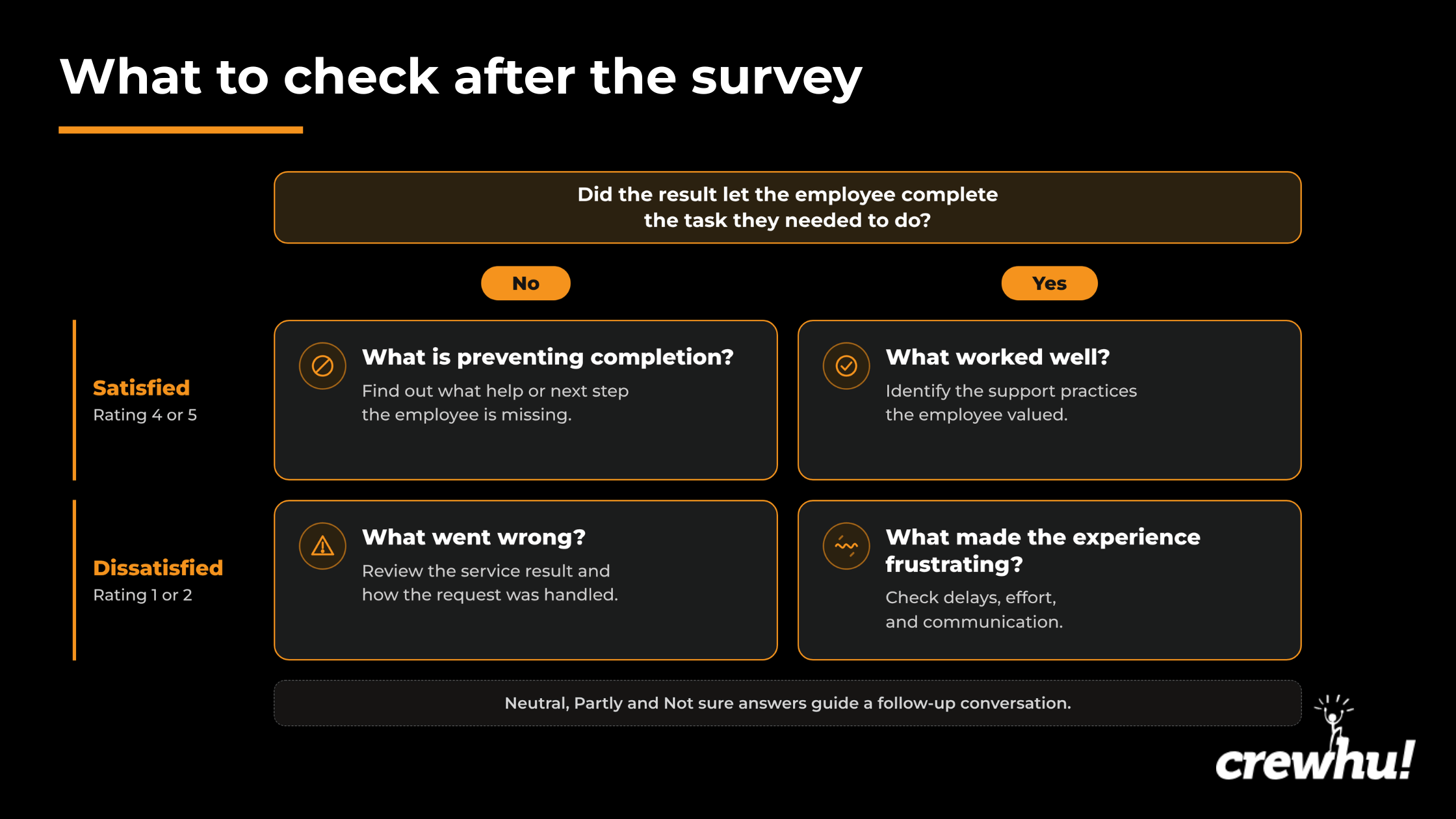
Partly? Ask what the employee managed to do and where the task got stuck. Not sure? Find out whether they've tried the result and what's unclear. A neutral satisfaction rating stays in the middle of the scale. Comments or a follow-up conversation can help explain it.
Finding the issue behind a rating
In East Lothian Council's 2024 internal procurement survey, 11 of 16 service areas responded. The survey's 15 questions covered procurement procedures, team interactions, communication, and areas where employees wanted more information or training.
Ratings for support and professionalism were generally favorable. Even so, 13% reported difficulty with forms or procedural steps, and 45% expressed interest in more training. The council's 2025 summary doesn't provide response counts for individual questions. The procurement team was simplifying forms and planned monthly drop-ins and training sessions.
A complaint about a form gives you a lead, but doesn't show exactly where the problem occurred. The UK Department for Education's 2026 guidance distinguishes service feedback from deliberate research into users' needs and behavior. Ask the employee to show where they got stuck and compare that step with the instructions.
Consider a request passed between support teams. “I didn’t know who had my request after it changed teams” points to uncertainty about the handoff. Check when the ticket was reassigned, who took ownership, and which messages reached the employee. Then ask what they understood would happen next.
In the IT Experience Podcast, Invesco's Sharon Aggarwal talks about employees who felt unheard even though their technical problems had been resolved. She also recalls cases where requests passed through more resolving teams without satisfaction ratings consistently falling when employees were kept informed. Her account gives managers a reason to check communication alongside the transfer history.
If an employee says “The ticket closed before I could try the shared drive,” check whether access was tested, when the ticket closed, and whether it was reopened. Those records help establish whether the employee got a usable result and how the team confirmed it.
For a late finance report, compare its agreed deadline with the actual delivery date. If it left out information, compare the report with the recipient's requirements and any correction requests. That gives the manager a basis for changing delivery timing or what the report contains.
How to use feedback to improve an internal service
Priorities depend on the work at risk as well as how many employees report a problem. Service records help identify what needs to change and who can change it.
Choosing a change and an owner
Imagine recurring access failures are holding up payroll, while more routine support requests are missing handoff updates. Even if the second problem is more common, the manager prioritizes the access fix because a missed payroll deadline carries greater consequences. The team can improve handoff updates in parallel without delaying the payroll repair.
At Invesco, Donna Xanthidis explains how the team used patterns in feedback to choose issues worth investigating. They talked with employee groups, mapped the steps people went through to get help, and used mystery shopping to examine the experience. An improvement register kept the resulting work visible. Sharon describes using employee experiences to prioritize problems beyond the demands of the loudest or most senior person.
Suppose employees repeatedly say they lose track of access requests after a transfer, and ticket records show no update from the receiving team. The team could test a specific rule: within one working hour of reassignment, the technician assigned to the request sends a message naming who's handling it and what happens next. The receiving-team manager owns the rule and checks transfers that miss the deadline.
Put the change in an improvement log. Record the missing updates, the tickets involved, the rule you're testing, who owns it, when it starts, which requests it covers, and when you'll review it.
Aggarwal also describes telling employees what changed in response to their feedback. In the handoff example, the team could say, “You told us it was hard to track requests after a transfer. The technician taking over now sends you an update with the next step within one working hour.”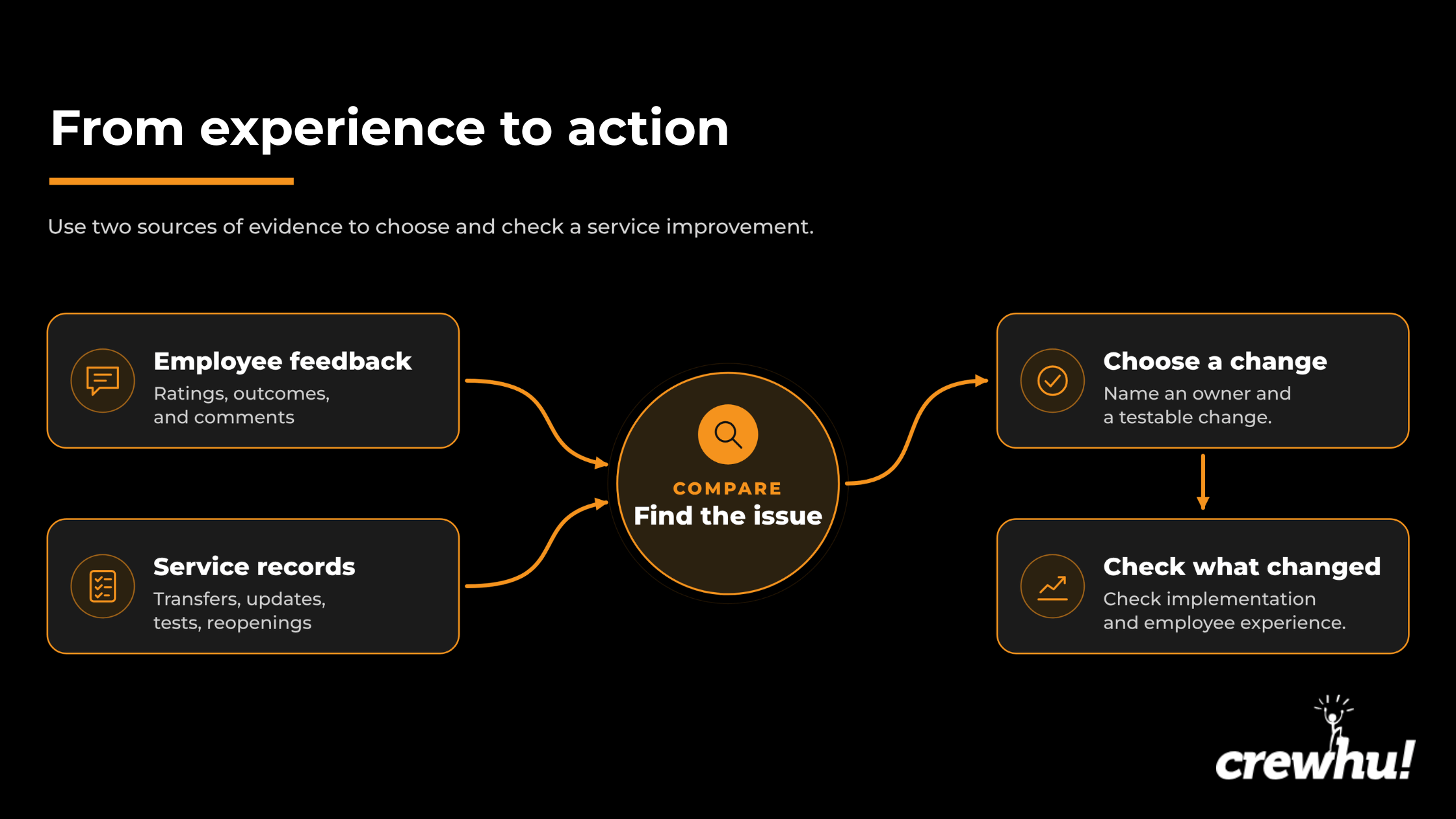
Checking what changed
Start by checking whether the rule was followed. Compare ticket reassignment times with update timestamps, then divide transfers updated within one working hour by all transfers covered by the rule. To assess employees' experience, compare similar transferred requests over equally long periods, using the same questions, scales, and invitation rules.
Track missing-update comments consistently in both periods. For each period, show how many submitted surveys mentioned a missing update, how many surveys were submitted for those requests in total, and what percentage mentioned a missing update. Compare that percentage with the percentage of submitted surveys that included any comment. A blank comment doesn't tell you whether the employee felt informed.
A lower share of missing-update comments is easier to interpret when a similar proportion of surveys contain comments and the ticket records show that updates were sent on time. Together, those findings can support keeping the rule. Follow up on any handoffs employees still describe as confusing.
Measuring Internal Customer Satisfaction with Crewhu
For internal services, Crewhu has two different feedback routes. CSAT is tied to support requests. A tailored ESAT campaign collects anonymous employee responses about a service they used over a defined period.
Follow up on internal requests with CSAT
Crewhu Custom CSAT supports separate survey configurations by team, board, or system, including rating labels and feedback tags. For internal ticket surveys, check that IP Restriction isn't blocking responses from the company network.
Explorer helps identify a particular gap: resolved tickets with no CSAT survey record. The manager needs the required access and an active ConnectWise integration. For those tickets, check contact information and survey settings. The available filters depend on the plan.
These figures have different denominators. Invitation coverage uses delivered invitations among eligible requests. Explorer's Conversion Rate uses tickets with a survey record among tickets in the selected period and filters. Automatically closed partial surveys can count as records. Pulse's Conversion Rate uses responses among delivered surveys.
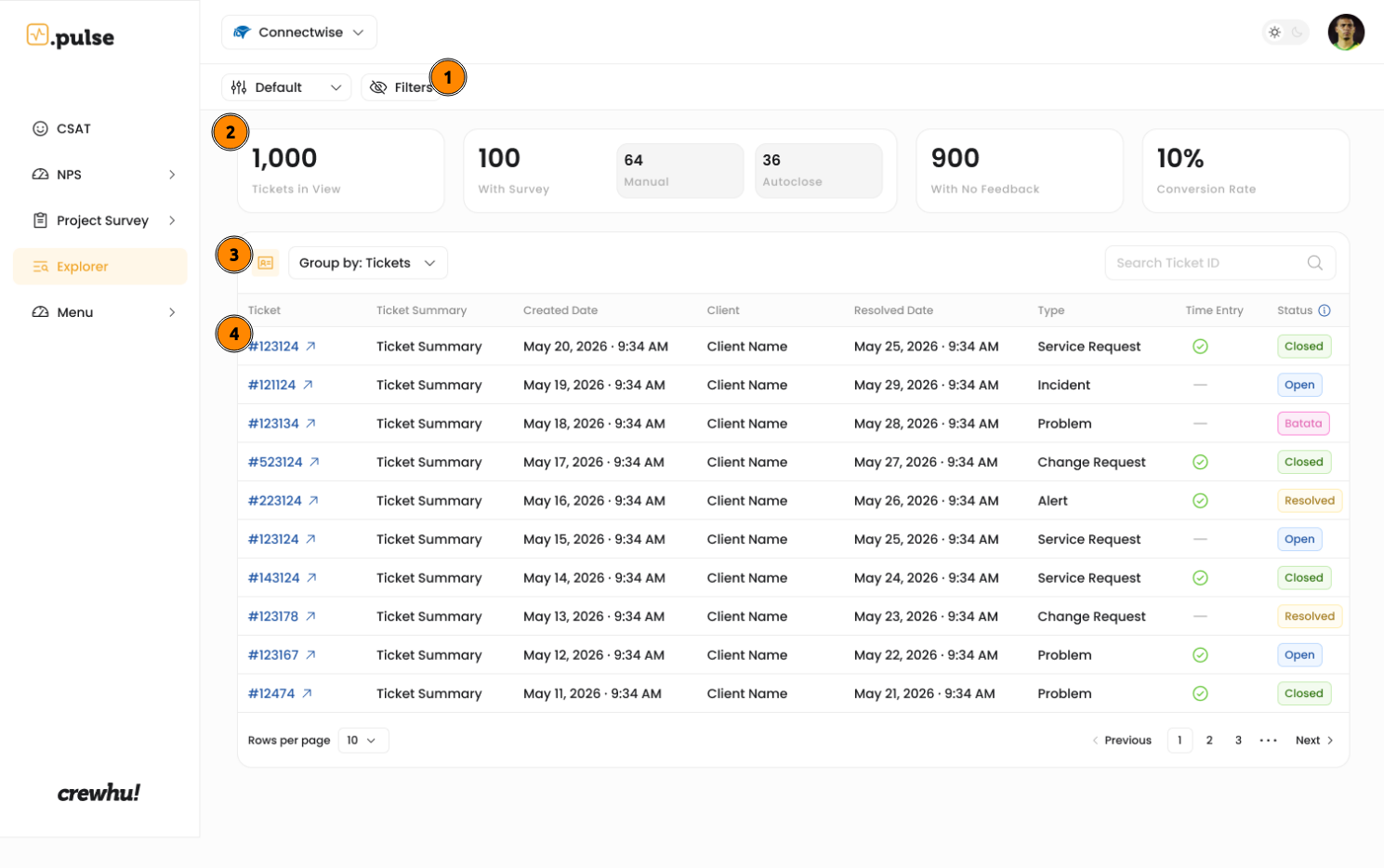
Crewhu's CSAT formula is (positive ratings − negative ratings) ÷ all ratings × 100. Neutral ratings remain in the denominator. That's different from the positive share calculated in the earlier five-point example. Compare scores only when the formulas and rating categories match.
Use tailored ESAT for a recurring internal service
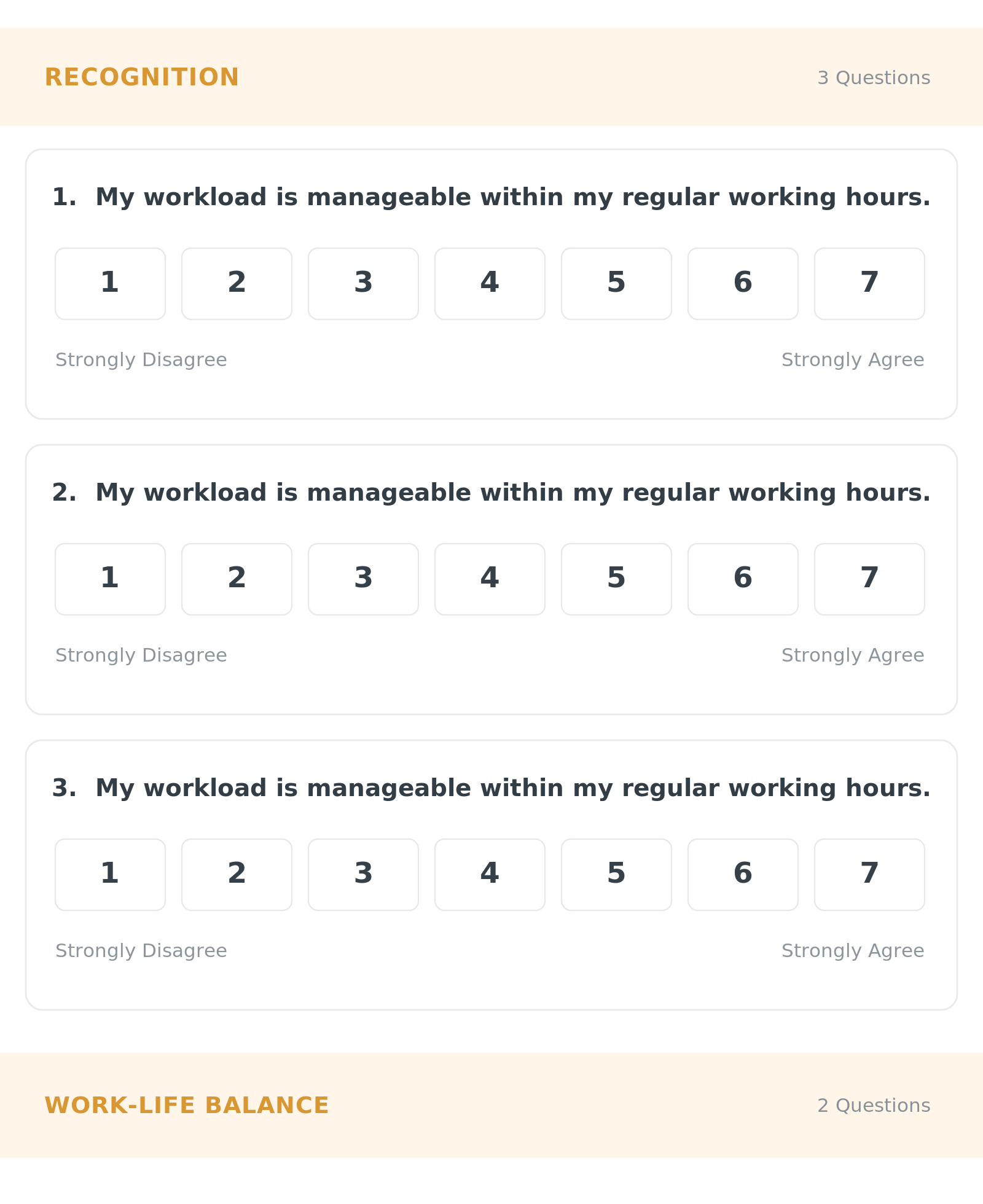
Responses are anonymous and use a fixed 1–7 agreement scale. Administrators can edit the survey template, and Grow also allows a survey to be built from scratch.
Imagine an April finance survey. First identify the employees who used the service, then select active employees through Add Audience by name, group, team, or location. Check the selection against service records before launch. Being part of a group doesn't establish that someone used the service.
“I’m satisfied with the support I received from [team] during [period]” asks about satisfaction. A separate statement can explore whether the report included the information employees needed for a particular decision.
Keep satisfaction and report-usefulness results separate. Show completed-response counts and averages on the 1–7 scale. Anonymous ESAT responses can reveal group patterns, but an unresolved individual request needs its own identifiable follow-up channel.
Make Every Response Count
A satisfaction score can look great in a report and still leave the team scratching its head. Ask the people who experienced a clearly defined service, keep the questions consistent, and show invitation, response, and valid-rating counts alongside the score. Then dig into the problems employees describe and check the relevant work, whether that's an individual request or a period of ongoing support. Give the next change an owner. At the next comparable review, check whether the change happened and what employees experienced afterward.
To explore feedback on your team’s internal support requests, book a Crewhu demo and discuss a setup for the systems you use.
FAQ
Is internal customer satisfaction the same as employee satisfaction?
No. Internal customer satisfaction concerns the help employees receive from other teams, such as payroll or procurement. Employee satisfaction covers their wider experience of work, including management, culture, and working conditions. An employee can like working at an organization and still find its purchasing process frustrating. Ask about the specific service so the feedback reaches the team responsible for providing it.
How should a team respond to low ratings after enforcing a policy?
Keep the valid approval requirement and investigate how the decision was handled. Procurement might correctly reject an unapproved supplier while leaving the employee unsure what to do next. Ask whether the low rating reflects the refusal itself, the way it was explained, or missing guidance. If the problem is clarity, help employees find an acceptable supplier without weakening the policy.
What is a good internal CSAT score?
Judge the score against earlier results for the same service. Check the number and mix of valid responses and whether serious problems remain unresolved. A higher score can still fall below the level the service owner considers acceptable, so tie the target to a specific improvement. With just 10 valid ratings, changing one neutral answer to satisfied raises the positive share by 10 percentage points.