-1.png)
Key Takeaways
- Customer feedback software covers several jobs, including general surveys, product feedback, CRM-connected service feedback, frontline action, and enterprise voice-of-customer programs.
- A platform can collect feedback from many channels and still leave ownership and follow-up to another system. Evaluate collection and action separately.
- Customer, account, product, ticket, location, and employee context determine how useful a score or comment becomes after it arrives.
- AI can group recurring themes and summarize open-text feedback, but buyers should test whether the platform separates the issues mentioned most often from those with the greatest customer or business impact.
- Total cost of customer feedback software depends on multiple elements, from response volume, contacts, tracked users, and data credits to integrations, onboarding, implementation, and ongoing administration.
Customer feedback software may look comparable on a feature list even when they support different decisions after a response arrives. That can be a problem when departments use the collected feedback for various needs: Product teams gather feature requests, merge duplicates, and explain roadmap decisions; support leaders need visibility into the customer, ticket, and agent behind a poor CSAT response; multi-location operators assign feedback to local teams; and enterprise CX functions combine surveys, calls, digital behavior, and open-text comments across several business units. For service businesses, the scope is narrower, keeping feedback tied to the ticket, visit, project, location, or employee behind the experience.
If you don’t hone in on your specific need, you risk sinking budget into what’ll end up being an expensive mistake. To avoid that headache, research and compare platforms by where feedback begins for your company, which people need to use it, what information must stay attached, where it should move, what action should follow, and who owns the response.
The right fit depends on what your feedback needs to support and the workflow around it. To give you a starting point, we compared eight platforms that cover distinct feedback jobs and traced what happens after a response arrives. The detailed profiles show where each one fits, what it costs, and what to test before you buy. Whatever your goals are, there’s software out there to help.
How we compared the platforms
We selected eight platforms that cover the main feedback jobs in the category. We then checked each company’s current product and pricing pages, help and integration documentation, and relevant product updates. For each platform, we compared:
- Primary feedback job
- Collection channels
- Measurement types
- Analysis capabilities
- The information that stays attached to a response
- Integrations
- Routing and ownership
- Pricing
- Trial availability
- Implementation requirements
We used official product pages and documentation for capabilities, published pricing, and plan details. When list pricing wasn’t public, third-party contract benchmarks provided an early budget range. For service-business use cases, we paid particular attention to whether the platform could keep customer, ticket, case, location, and employee context attached, assign follow-up clearly, and return the signal to the system where the work happened.
We also reviewed available user feedback on G2 to identify recurring themes in setup, usability, reporting, support, and day-to-day administration.
Customer feedback software compared
|
Platform |
Best for |
What happens after feedback |
Pricing and trial |
|
Crewhu |
Service businesses using transactional feedback |
Keep service context attached through follow-up and recognition |
Listen $119/month for five users, plus $300 implementation; trial available |
|
SurveyMonkey |
Flexible general survey programs |
Analyze, export, or connect survey responses |
U.S. pricing: Free; Flex $49/month; Advantage $39/month billed annually |
|
Typeform |
Branded, conversational surveys and forms |
Route responses through logic and integrations |
Free; Basic $39 monthly or $28/month billed annually, with 100 responses |
|
Canny |
Product feedback and feature prioritization |
Turn requests into priorities, roadmaps, and updates |
Free for 25 tracked users; Pro $79/month billed annually; 14-day trial |
|
HubSpot Service Hub |
Feedback connected to CRM and support records |
Keep CRM context attached and use response properties in workflows and reports |
Professional from $90/seat/month billed annually, plus $1,500 onboarding; 14-day trial |
|
AskNicely |
Frontline and multi-location service teams |
Assign feedback and surface local action |
From $449/month, billed annually; price scales with response volume; no free trial |
|
Qualtrics |
Enterprise VoC, research, and program governance |
Analyze multi-touch point signals and distribute recommendations |
Custom pricing; Vendr reports a $30,000 median annual contract |
|
Medallia |
Enterprise multi-source experience operations |
Unify high-volume signals and route insight into operations |
Custom pricing based on Experience Data Records; |
*Product and pricing details checked on August 27, 2026. Annual equivalents and third-party contract benchmarks provide an early budget range. Final cost depends on response volume, contacts, users, modules, integrations, implementation, and contract scope.
What customer feedback software includes
Customer feedback software collects, organizes, analyzes, and routes customer input from surveys, product interactions, support conversations, reviews, calls, and other touchpoints. Solutions can encompass features such as:
- Survey and form tools collect structured responses through email, websites, links, QR codes, and embedded forms.
- Product-feedback platforms organize feature requests, duplicates, prioritization, roadmaps, and release updates.
- CRM and support products connect feedback with customer records, conversations, cases, and tickets.
- Service-feedback platforms tie responses to a specific ticket, project, visit, location, account, or employee so the context remains available during follow-up.
- Enterprise voice-of-customer systems combine surveys with digital behavior, contact-center interactions, open text, and journey data.
- Feedback-intelligence platforms analyze data that already exists across surveys, support systems, reviews, calls, and other sources.
To make the market easier to compare, ask: How many feedback sources does the platform collect or analyze? And how far does it carry each response after collection? Some tools stop at reporting or export, while others preserve context, assign an owner, trigger follow-up, and keep the action visible. In this comparison, we refer to those dimensions as “source breadth” and “action depth.”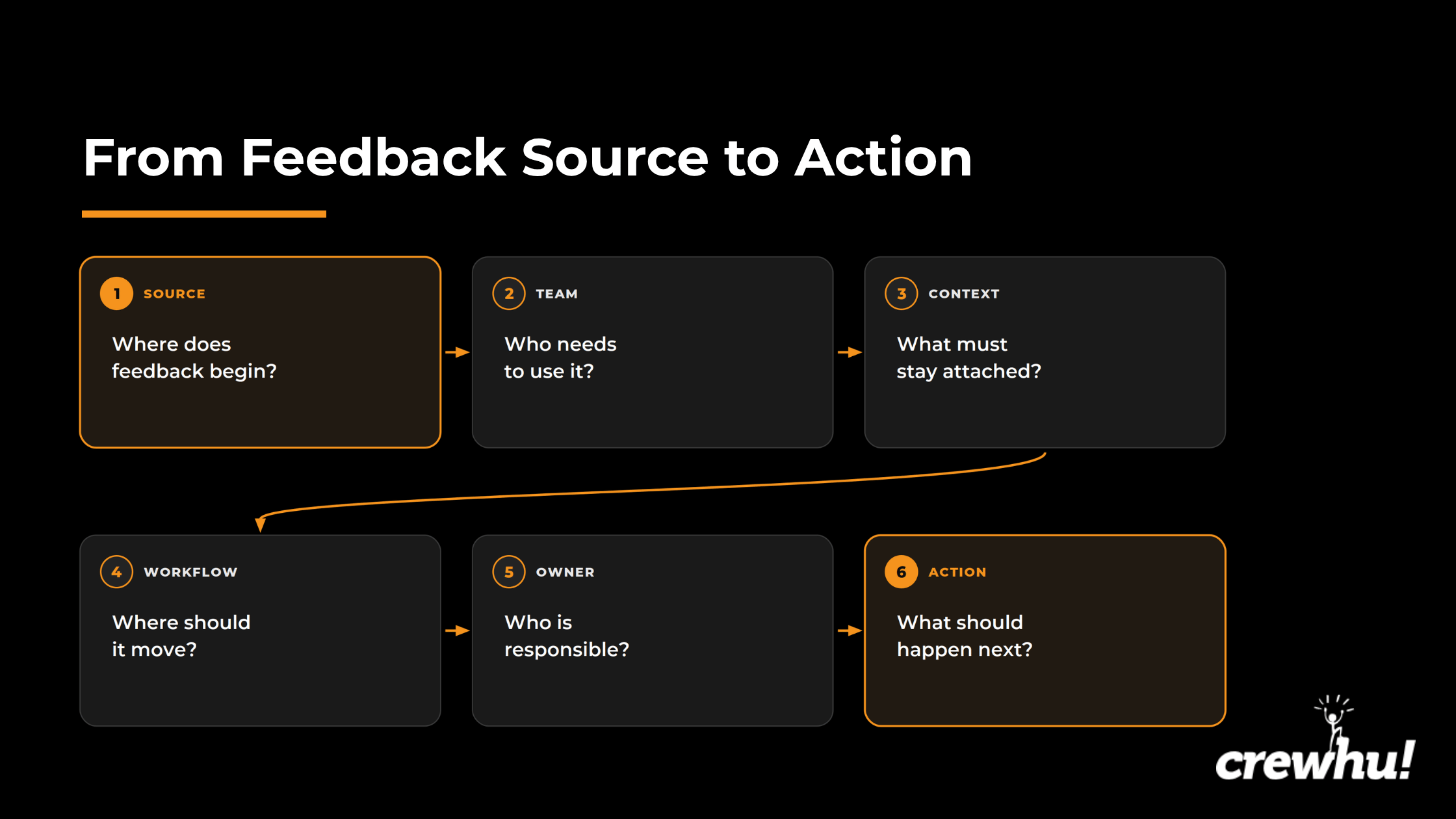 For service businesses, the key distinction is what happens after that context is captured. The platform may connect the result to recovery, coaching, recognition, reporting, or a process change. Use the diagram above as a consistent lens for the profiles that follow.
1. CREWHU
Best for: Service businesses that want transactional feedback tied to customer interactions and the employee involved, with a particularly strong fit for MSPs using PSA or help desk workflows.
Features:
- Customer feedback workflows with one-click surveys after resolved tickets, service replies, and email-signature interactions
- PSA and help desk integrations that tie feedback to the ticket and the people who worked on it
- Crewhu Pulse for centralized CSAT visibility, tag-based sentiment patterns, AI-generated insights, and suggested actions
With ConnectWise, Autotask, and Zendesk integrations, Crewhu can tie feedback to the person who resolved the ticket. Depending on the integration, it can also assign that feedback to everyone who logged time or to employees the customer selects. That keeps the score, comment, and service record together, so managers can see what happened and who was involved when they follow up.
The same feedback can feed coaching and service reviews, while positive responses can trigger recognition and rewards. Ticket-based teams are the clearest fit here, but the same approach can also support field visits, service cases, projects, and other frontline interactions.
Crewhu holds a 4.7 out of 5 rating from almost 100 G2 reviews. Reviewers in IT and services highlight easy CSAT collection, employee recognition and rewards, Slack notifications, contests, and practical visibility into customer-service performance.
Pricing and trial: Crewhu pricing lists the Listen plan at $119 per month for five users, with a $300 implementation fee, and Recognize is $239 with $600 implementation. The Grow plan is $399 with $1,000 implementation and adds NPS campaigns, custom surveys, selected custom sources and metrics, and automated contests and rewards. Crewhu also offers a 14-day free trial and a no-contract purchase option.
What to test in a demo: Bring one real service event from the system your team uses. Trace it from the ticket or service trigger through the customer and service context, employee-credit rule, notification, feedback write-back, follow-up view, reporting, and plan requirements.
2. SurveyMonkey
Best for: Organizations that need a flexible survey platform across several research and customer-feedback use cases.
Features:
- Customer satisfaction, NPS, CES, market research, event feedback, and custom questionnaires
- Charts, filters, cross-tabs, thematic analysis, sentiment analysis, and text-analysis tools for open-text responses
- More than 200 integrations for CRM, collaboration, marketing, and analytics workflows
The platform’s breadth makes it a solid choice for several departments without requiring a full enterprise VoC implementation. Responses can move into connected systems, and the organization still needs to define who owns the next step and where follow-up is tracked. Plan limits require closer attention as the program adds advanced logic, collaboration, exports, integrations, governance, or larger response allowances.
SurveyMonkey reviews on G2 highlight straightforward survey creation, useful templates, a familiar interface, and clear reporting. The trade-offs become apparent through lower-tier limits, customization constraints, and the cost of advanced plans.
Pricing and trial: The Basic plan is free and lets users view up to 25 responses per survey. In the U.S., Flex costs $49 per month, and Advantage is listed at $39 per month when billed annually. Higher plans add collaboration, analysis, and governance capabilities. Check SurveyMonkey pricing against your expected response volume and required exports.
What to test in a trial: Build one real survey with the required logic, branding, response volume, open-text analysis, exports, and destination integration. Confirm which plan unlocks the complete workflow for your team.
3. Typeform
Best for: Teams that want surveys and forms to feel polished, conversational, and consistent with the surrounding brand experience.
Features:
- Conversational surveys and forms that typically present one question at a time
- Conditional logic, hidden fields, and calculations
- Webhooks and integrations, with automated follow-up that can move responses into other systems
Typeform suits customer interviews, onboarding forms, event feedback, lead qualification, and shorter satisfaction surveys where the completion experience matters. Its main strength is collection. Teams that need multi-source VoC governance, deep service-ticket context, complex permissions, or enterprise action management will usually need another system or workflow around it.
Typeform reviewers often praise its polished presentation and how easy its forms are to complete. Response allowances and pricing become greater concerns, though, as teams add volume, branding, logic, collaboration, and integrations.
Pricing and trial: Typeform offers a free plan. From there, its Basic tier is listed at $39 per month or $28 per month with annual billing, including 100 monthly responses and one user. The Plus and Business tiers increase in both price and response volume, branding control, and team capacity. Typeform pricing should be estimated against realistic monthly peaks.
What to test in a trial: Complete the form on the devices your customers use. Check mobile behavior, conditional paths, hidden-field capture, respondent identification, response limits, exports, and the system that should receive the result.
4. Canny
Best for: Product teams that need to collect feature requests, consolidate duplicates, prioritize opportunities, and communicate roadmap progress.
Features:
- Central feedback boards for customer and internal submissions
- Voting, segmentation, roadmaps, and changelogs
- Autopilot for capturing feedback from connected customer conversations and identifying related requests, with account data for customer-segment context
Together, these features create a visible path from request intake to prioritization and release communication. Canny is built around product decisions though, so teams that need post-service recovery or broad enterprise VoC workflows should evaluate a different product class.
User feedback points to the centralized feedback board and straightforward experience as practical strengths. Customization, filtering, integration depth, and tracked-user pricing become more complicated as the program expands.
Pricing and trial: Canny’s current pricing lists a Free plan for up to 25 tracked users. The Pro tier then starts at $79 per month when billed annually, or $99 on monthly billing, for 100 or more tracked users. Business pricing is customized. A 14-day Pro or Business trial is available without a credit card. Pricing is based partly on the number of tracked users, so be sure to include an estimate when considering Canny.
What to test in a trial: Import real feedback from your support or customer success team. Check deduplication, segmentation, account context, tracked-user counting, private boards, roadmap permissions, and customer notifications after a status change.
5. HubSpot Service Hub
Best for: Organizations already using HubSpot that want customer feedback connected to CRM, ticketing, automation, and reporting.
Features:
- Customer feedback surveys, including NPS, CES, CSAT, and custom surveys, in Service Hub Professional and Enterprise
- Survey responses linked to the contact and associated company, plus the triggering ticket or deal when applicable
- Survey response properties that can be used in segments, reports, and workflow enrollment
HubSpot’s main advantage is its continuity across the CRM and service environment. Depending on the survey trigger, a response can be linked to the contact and company, as well as to a ticket or deal. Those properties remain separate from ordinary contact details, so reporting and automation need to be configured around the survey response. The quality of that continuity still depends on clean CRM data, ticket practices, permissions, life cycle definitions, and workflow design.
Across Service Hub reviews on G2, the unified customer record, ticketing, automation, and broad ecosystem stand out as practical advantages. Pricing, features restricted to higher plans, reporting complexity, and ongoing administration are the main recurring cautions.
Pricing and trial: The free tier only allows up to two users, making it impractical for most businesses. The Starter plan is where the per-seat model starts, at $7 a month per seat. Service Hub Professional starts at $90 per seat per month when billed annually and requires $1,500 in onboarding. Enterprise starts at $150 per seat per month and requires $3,500 in onboarding. A 14-day Service Hub free trial is available, but buyers should confirm which feedback functions are active in a trial account.
What to test in a trial or demo: Follow one survey response through the associations created by your chosen trigger. Confirm whether it links to the contact, company, ticket, or deal you expect, then test workflow enrollment, ownership, reports, permissions, survey limits, and which features require Professional or Enterprise.
6. AskNicely
Best for: Multi-location and frontline service organizations that want customer feedback to reach local leaders and teams quickly.
Features:
- NPS and CSAT surveys with automated collection
- Dashboards, leaderboards, location-level reporting, and frontline visibility
- Feedback assignment, collaboration integrations, AI-generated insight reports, and broader action tools on higher tiers
AskNicely is designed to move feedback quickly from the customer to the local leader or team responsible for the experience. This operating model suits hospitality, healthcare, field service, financial services, and other distributed organizations that need central reporting with local follow-up.
Setup, support, ease of use, and frontline visibility are the most frequently cited positive themes in AskNicely reviews. Meanwhile, survey customization, filtering, reporting depth, and occasional technical friction are the main recurring concerns.
Pricing and trial: AskNicely’s 2026 pricing information lists its Learn plan at $449 per month, Grow at $849, and Transform at $999, billed annually. The current pricing page says the final price scales with response volume and that plans are primarily annual. Although AskNicely doesn’t offer a free trial, buyers can request a personalized demo.
What to test in a demo: Use a real location hierarchy and customer journey. Confirm the survey trigger, response assignment, frontline access, escalation, reporting by location, collaboration integrations, and response-volume assumptions behind the proposal.
7. Qualtrics Customer Experience
Best for: Enterprises that need a governed voice-of-customer program across several channels, journeys, business units, and research methods.
Features:
- Surveys combined with digital, contact-center, location, and customer-journey capabilities
- Guided survey design, follow-up prompts, dashboards, text analysis, and AI-guided recommendations
- Advanced research, segmentation, permissions, governance, and multiple feedback programs in one environment
Qualtrics is built for complex programs that need research depth, governance, and coordinated use across journeys and business units. That breadth requires substantial implementation planning. Teams need to define journeys, contacts, expected interaction volume, roles, dashboards, integrations, and who will run the program before Qualtrics can prepare an accurate proposal.
Customization, survey logic, and analysis across structured and unstructured feedback are the highlights in many Qualtrics Customer Experience reviews. Cost, complexity, administration, and the learning curve are the most prominent detractors, especially for smaller teams.
Pricing and trial: Qualtrics pricing is customized according to planned use, which it defines as interactions, meaning data records collected or processed by the platform. Vendr reports a median annual contract of $30,000 though, based on over 300 purchases, with observed values ranging from about $6,900 to almost $140,000. Interaction volume, selected products, integrations, services, and contract scope can all affect the final proposal.
What to test in a demo: Define one complete program before the meeting. Confirm collection channels, interaction volume, permissions, text analysis, dashboards, integrations, exports, implementation services, and the AI capabilities included in the proposed package.
8. Medallia Experience Cloud
Best for: Large organizations that need to combine high-volume experience signals and route insight into operations across many teams and touchpoints.
Features:
- Signals from surveys, digital behavior, contact centers, conversations, social sources, and other customer interactions
- An experience data record model that provides a shared layer for analytics, workflows, security, and self-service access
- Text analytics, AI-supported themes and summaries, root-cause assistance, alerts, and action planning
Medallia Experience Cloud is built for organizations with the implementation, governance, data-integration, and change-management capacity to support a broad experience program. It can coordinate insight across teams and touch points. A narrower feedback program may carry more implementation and services overhead than the use case requires.
Reviews about the service emphasize centralized qualitative data, text analysis, alerts, and the ability to distribute insight across the organization. Configuration complexity, specialist requirements, and limited self-service flexibility are the main recurring cautions.
Pricing and trial: Medallia pricing uses annual tiers based on experience data records. Each record includes the data associated with a discrete customer or employee interaction. However, SpendHound reports an average annual spend of $20,671 for SMB customers and $598,947 for enterprise customers. Compare those benchmarks with your anticipated record volume, modules, services, and implementation scope.
What to test in a demo: Use a representative set of structured and unstructured signals. Ask Medallia to show how it ingests data, resolves identities, analyzes text, identifies drivers and root causes, assigns alerts, supports action planning, manages permissions, scopes implementation services, and itemizes the full annual cost.
Additional customer feedback tools worth considering
Zonka Feedback
Zonka Feedback is an omnichannel alternative for teams collecting NPS, CSAT, CES, and other feedback through email, SMS, websites, apps, QR codes, kiosks, and offline devices. It also supports AI feedback intelligence, integrations, workflows, and case management.
Zonka Feedback pricing is customized, with Feedback Management priced primarily by responses and AI Feedback Intelligence by data credits. The company offers a 14-day free trial.
Zendesk
Zendesk fits support teams that want CSAT attached directly to solved tickets and agentic workflows. Its native survey experience sends rating requests after ticket resolution and preserves the relationship with the original support record.
Zendesk pricing starts at $19 per agent per month for the Support Team plan when billed annually. Suite Team sits at $55, Suite Professional is $115, and Suite Enterprise + Copilot requires a sales call. Zendesk offers a 14-day Suite trial.
Chattermill
Chattermill is an analysis layer for organizations that already collect feedback through surveys, support systems, reviews, calls, and other channels. It unifies those sources and analyzes themes, sentiment, and customer-experience patterns. The solution works alongside the systems that collect the original feedback.
Chattermill pricing is customized based on feedback volume and use case, but its 2026 pricing materials list the Pro plan at 10,000 monthly credits and Team at 30,000.
Salesforce Feedback Management
Salesforce Feedback Management suits organizations that want surveys and response data inside the Salesforce service environment. Salesforce sells it as an add-on to Service Cloud.
Current pricing includes the Response Survey Pack for $300 per 1,000 responses, the Starter plan at $13,500 per organization per month, and Growth at $46,000 per organization per month, billed annually. This pricing and deployment model is most practical for large Salesforce environments with substantial response volume and governance requirements.
How to choose customer feedback software
Choose the platform based on the feedback job, the information that must stay attached, the person who owns the response, and the action that should follow. Then verify the required channels, analysis depth, integrations, plan limits, and implementation work.
1. Start with the feedback job
Determine what decision or action the feedback you collect should drive. For instance, a general survey program may start with an emailed questionnaire and end with a report. Product feedback often appears in a support conversation and informs a prioritized roadmap item. Service feedback can follow a closed ticket and lead to follow-up, recovery, recognition, or a procedural change.
Several products may collect the same score. The right fit keeps the relevant context attached and supports the next decision your team needs to make.
2. Confirm channels and measurement types
Group the channels your business needs to support according to where feedback enters the workflow, such as:
- Email, websites, and mobile apps
- Tickets, cases, and chat conversations
- SMS, QR codes, kiosks, and offline devices
- Calls and speech
- Product-feedback boards
- Public review sites
Then confirm the required feedback types. These may include NPS, CSAT, CES, custom ratings, open-text comments, feature requests, interview responses, or behavioral signals.
Interpreting an NPS score requires context. Read NPS benchmarks against the industry, customer relationship, survey type, and measurement setting to ensure you have a complete picture to anchor your interpretation.
Teams managing review requests, Google policy, public responses, or multi-location reputation workflows should compare Google review management software as a separate category.
3. Check what information stays attached
Knowing what produced a response gives the team the information needed to act on it. Depending on the workflow, the response may need to stay connected to:
- Customer, account, and segment
- Previous feedback history
- Product, feature, campaign, or survey source
- Ticket, case, project, or service event
- Agent or employee
- Location
Ask how each relationship is created. Some platforms receive context directly from the source system. Others depend on hidden fields, contact matching, imports, API calls, or later manual work.
A CRM sync that updates contact data solves a different problem from a service event that starts a survey. Dashboard integration differs again from a workflow that writes the response back to the record where employees work.
4. Test analysis and prioritization
Theme detection and sentiment analysis reduce the manual work required to review open-text feedback. Issue frequency and customer impact may point in different directions.
Ask whether the platform can show:
- Topic frequency, sentiment, and changes over time
- Affected segments
- Correlation with outcomes and likely impact
- Root causes, confidence, and supporting evidence
- Source comments behind each summary
The team should also understand which findings come from rules, statistical models, generative AI, or human analysis.
At Holiday Inn Club Vacations, internet complaints dominated the feedback. In one “Experience Action” episode, host and CCXP Jeannie Walters speaks with Camille Kremer, senior director of customer experience at Holiday Inn Club Vacations, about how driver analysis revealed which issues were more closely tied to the overall experience and how the team used experiments to decide where action would matter most. For buyers, the practical question is whether the platform can move beyond counting mentions, show which issues deserve priority, and provide enough evidence to test the next step.
5. Verify routing and ownership
A usable workflow assigns each response to an owner and keeps the follow-up status visible. For a negative response, confirm the full handoff:
- Who receives the alert and which system receives the feedback
- How the owner is selected and how escalation works
- Where follow-up status appears and how leaders find unresolved feedback
- What happens when customer or employee mapping fails
- Which actions and status updates appear in the record where the team works
The platform should route and assign the response. A wider customer feedback loop defines how the business follows up, recovers, learns from recurring patterns, and changes the underlying process.
During evaluation, identify how far the platform carries the signal and where a person or team needs to take over.
6. Test one real workflow in a trial or demo
Use one real feedback workflow as the trial or demo scenario. Follow it from beginning to end:
- Trigger the request or feedback capture.
- Confirm how the customer, account, ticket, product, or employee is identified.
- Submit structured and open-text feedback, then inspect the analysis.
- Test routing, ownership, escalation, and permissions.
- Review reporting and data exports.
- Identify the exact package that fits this process and the cost required.
Test what happens when the workflow doesn’t follow the expected path. Use an incomplete contact record, duplicate request, unmapped employee, low-confidence theme, unavailable integration, and unassigned response. These cases show how much operational work remains outside the product.
What customer feedback software really costs
The subscription is only one layer of the annual cost. You also need to account for usage, premium capabilities, implementation, integrations, and ongoing administration.
Software access
As the above options showed, pricing may be based on:
- Survey responses or contacts surveyed
- Tracked users, agents, or employee seats
- Monthly data credits or experience records
- Connected sources and platform modules
- Organization-wide contracts
A low starting price may cover a small response allowance or exclude the integrations, analysis, and permissions required by the real program. You get what you pay for, so always read the fine print before handing over the company credit card.
Analysis and premium capabilities
Check that your chosen plan includes:
- Thematic and sentiment analysis
- AI summaries and driver analysis
- SSO and advanced permissions
- API access and custom exports
- Premium integrations
Some companies place these capabilities in higher tiers, while others charge based on contacts, responses, data credits, or experience records.
Implementation and integrations
Implementation may include:
- Onboarding, survey design, and training
- Customer and account mapping
- CRM, PSA, help desk, or product-system connections
- Permission and dashboard configuration
- Migration and workflow testing
- Professional services
Implementation also consumes time from the buyer’s CX, product, operations, service, IT, and finance teams, in addition to any provider implementation fees.
Ongoing administration
Include the ongoing work required for:
- Program changes across surveys, workflows, locations, and teams
- Usage management, including response overages
- System upkeep for integration failures and dashboard maintenance
- Review of AI-generated themes and data-quality checks
- Contract administration, including renewals and data exports
- Migration planning for a future switch
Ask every shortlisted provider for low-, expected-, and high-volume annual scenarios built from the same channels, response volume, users, integrations, modules, and implementation assumptions.
Choose the platform that fits your feedback job
A reliable platform captures the required signal, keeps the necessary context attached, routes it to a clear owner, and supports a next action that your organization can sustain.
Crewhu stands out in this comparison for service businesses that need feedback to stay connected to the work and the people behind it. Its PSA and help desk workflows make the fit particularly strong for ticket-based operations, but the same principle applies wherever customer feedback needs to return to day-to-day service work.
Book a Crewhu demo to test your real service-feedback workflow from the trigger through customer and ticket context, and all the way to employee attribution, routing, reporting, and follow-up.
FAQs
What is the best customer feedback software for a small business?
For a small service business, Crewhu is a strong fit when feedback needs to drive follow-up, reporting, and employee recognition inside the service workflow. SurveyMonkey suits flexible surveys, Typeform prioritizes presentation, Zonka Feedback supports several collection channels, and HubSpot fits businesses already using its CRM. Compare the required channels, response volume, integrations, and action expected after each response before choosing.
How much does customer feedback software cost?
Prices range from free plans to enterprise contracts worth tens or even hundreds of thousands of dollars per year. Providers may charge by responses, contacts, tracked users, employees, agents, data credits, integrations, or platform modules. Implementation, onboarding, premium analysis, overages, and internal administration may sit outside the listed subscription. Compare annual scenarios using the same response volume, channels, users, integrations, and support assumptions.
What is the difference between survey software and a customer feedback platform?
Survey software primarily creates questionnaires, collects responses, and reports results. A customer feedback platform can connect responses with customer, account, product, ticket, location, or employee records. It may also analyze unstructured feedback, assign ownership, trigger workflows, support recovery, and combine several signal sources. A general survey tool often covers research needs. Operational programs usually require stronger context, routing, integrations, and governance.
Can customer feedback software integrate with a CRM or help desk?
Yes. Many platforms connect with CRM, help desk, collaboration, product, and service systems. Integration depth varies considerably though. One connection may synchronize contact records, while another might start a survey after a ticket closes, write the response back, alert an owner, and preserve service context. During a trial, verify the exact object, event, fields, direction, timing, permissions, failure handling, and plan required for the intended workflow.
Which customer feedback tools support NPS, CSAT, CES, and sentiment analysis?
SurveyMonkey, HubSpot, AskNicely, Qualtrics, Medallia, Zonka Feedback, and several other platforms support combinations of NPS, CSAT, and CES. Sentiment and thematic analysis depend more heavily on product and plan. SurveyMonkey, Qualtrics, Medallia, Chattermill, and Crewhu Pulse provide different forms of open-text or sentiment analysis. Confirm the exact metric, channel, language support, data volume, analysis method, and current package before purchase.