.png)
Key Takeaways
- Employee recognition platforms solve different jobs, from everyday peer appreciation and milestone programs to global rewards and recognition connected to customer or operational signals.
- The recognition trigger is a key test of how closely connected the software is to the contribution being acknowledged.
- Collaboration integrations make recognition easier to give and see. Operational integrations can preserve context about the work that created it.
- Subscription price is only one part of the budget. Reward expenses, implementation and integrations, minimums, fees, and ongoing administration can materially change the annual cost.
- Service businesses need to ensure customer feedback and service context are linked to the employee and behavior being recognized.
Recognition programs can miss valuable work when appreciation depends on a manager’s memory or when customer feedback and service data are kept separate from the employee who earned it. The problem grows across shifts, locations, and customer-facing roles, where managers can’t observe every service moment.
Many recognition software solutions appear similar at first glance. The practical differences are what starts the recognition, who can participate, and how much context stays attached to the contribution. A clean handoff, strong customer feedback, a work anniversary, and a manager-observed contribution all deserve recognition, but each one reaches the program through a different signal.
For service businesses, especially MSPs, Crewhu takes the top spot in this comparison because it connects customer feedback and service-system activity to timely recognition for the employee or technician behind the work. Achievers and Awardco suit complex enterprise programs, while Bonusly is a lighter choice for everyday peer appreciation. Guusto prioritizes frontline access, and Recognize fits organizations centered on Microsoft 365.
The right shortlist changes with workforce access, the recognition trigger, reward funding, and the systems that need to stay connected. Start with the recognition job, then work backward to the product.
How we compared the platforms
To hone in on the best options on the market today, we checked each company’s current product features, pricing information, integrations and help documentation, and any relevant recent product or ownership changes. Our comparison covers buyer fit, recognition triggers, workforce access, integrations, reward models, pricing, and implementation requirements. Selected public reviews are also included to add context on setup, usability, rewards, and support.
|
Platform |
Best fit |
How recognition starts |
Pricing |
|
Crewhu |
Service businesses, especially MSPs, connecting recognition to customer feedback and PSA/help desk workflows |
Peer, life cycle, customer feedback, resolved-ticket, service system, and KPI signals |
Recognition plan starts at $239 monthly for five users; implementation fees apply |
|
Achievers |
Global enterprise programs |
Peer, manager, external, and life cycle recognition |
Custom pricing; Vendr reports $89K–$321K a year |
|
Awardco |
Configurable enterprise awards and incentives |
Peer, milestones, formal programs, and configured workflows |
Packages from $3,000; larger programs quoted |
|
Bonusly |
Everyday peer recognition |
Peer, manager, and milestone recognition, with configured automation options |
Free up to eight users; Team from $3 per user monthly; rewards are separate |
|
Guusto |
Frontline and deskless teams |
Human recognition, gifts, milestones, and API-based reward actions |
Lite from $125/month, billed annually; Higher plans use sender-and-recipient pricing |
|
Motivosity |
Customer shoutouts and modular rewards |
Peer, manager, goals, milestones, challenges, and customer shoutouts |
From $3,000 a year; modular custom pricing |
|
Nectar |
Mid-market recognition with broader culture tools |
Peer, manager, milestones, custom awards, and configured Flows |
$5–$6 per employee/month, billed annually |
|
Recognize |
Microsoft 365 environments |
Peer, manager, milestones, programs, and configured Jira workflows |
Custom annual pricing; G2 reports $1–$2 per employee monthly |
*Prices accurate as of July 25, 2026. Custom pricing is scoped by employee count, modules, integrations, and implementation. Third-party figures are planning benchmarks. Reward funding and some fees may be separate.
What employee recognition software does, and what it needs to notice
Employee recognition software helps organizations acknowledge contributions consistently and visibly. Common functions include peer and manager recognition, birthdays and work anniversaries, formal awards, nominations, points and rewards, and social feeds.
Recognition platforms often operate alongside employee engagement, communications, rewards, and performance systems.
For service businesses, they acknowledge and reinforce contributions like:
- Positive customer feedback
- Completed job, ticket, project, or service action
- Successful service recovery
- Clean handoff between employees or teams
- Proactive customer update
- Strong documentation
- Progress against a meaningful KPI
- Ownership and follow-through during difficult work
Some moments depend on human judgment, while others leave a clear signal inside a survey, help desk ticket, PSA, CRM, or reporting tool. That difference explains why two products with similar rewards catalogs can fit very different organizations.
1. Crewhu
Best for: Service businesses, especially MSPs, that want recognition tied to customer feedback, PSA or help desk activity, and the employee or technician behind the work.
Features:
- Peer, manager, and executive recognition through the web platform, Slack, and Microsoft Teams, plus automated birthday and work-anniversary badges
- Badges, Crewcoins, rewards, and reporting organized by source, location, team, and employee
- Documented PSA and help desk workflows that can connect positive customer feedback or a resolved-ticket survey to the credited employee or employees
Crewhu can turn positive customer feedback into recognition while the service moment is still fresh. In documented ConnectWise, Autotask, and Zendesk REST workflows, employee-credit options can credit the technician who resolved the ticket, everyone who entered time, or employees selected by the customer. Depending on the setup, the response can then award a badge and Crewcoins to the credited employee.
Crewhu can bring chosen KPI, goal, and contest signals into the same recognition environment. Managers can then use the resulting feedback, attribution, recognition, reward, metric, and reporting context in the follow-up routines they already run.
Crewhu holds a 4.7 out of 5 rating across 94 G2 reviews. Users in IT and services highlight the combination of easy CSAT collection, employee recognition and rewards, gamification and contests, and visibility into customer-service performance.
Pricing: Crewhu pricing lists the Listen plan at $119 monthly, Recognize at $239, and Grow at $399 for a five-user base. Implementation fees are $300, $600, and $1,000, respectively, and monthly pricing scales with the maximum number of active employees. Recognition Badges start at the Recognize tier.
What to test in a demo: Bring one real service event from your system to try. Follow it from the trigger to customer feedback, the employee-credit rule, recognition and reward logic, and reporting, then confirm which plan and integration are required.
2. Achievers
Best for: Global organizations that need one recognition and rewards program across countries, business units, and workforce groups.
Features:
- Monetary and non-monetary recognition, nominations, birthdays, employee milestones, and years-of-service programs
- A global rewards marketplace, desktop and mobile access, and a platform available in 32 languages
- SSO, analytics, reporting exports, administration tools, and HCM integrations such as Workday
A March 2026 G2 review described recognition and gift card redemption as straightforward but reported a difficult return process after a damaged catalog item. Fulfillment, returns, and exception handling deserve the same scrutiny as marketplace size.
Pricing: Achievers provides custom pricing, but Vendr's procurement data shows annual spend from about $89,000 to $321,000, with a median near $121,800. Employee count, integrations, reward programs, and implementation scope determine the range.
What to test in a demo: Confirm the countries and languages, reward options, administrative roles, integrations and reporting, and rollout services included in the proposal. For event-triggered recognition, ask which business events are supported, how they’re configured, and what context reaches the recognition record.
3. Awardco
Best for: Organizations that need formal awards, service programs, incentives, and configurable connections to business systems.
Features:
- Peer, manager, and external recognition, along with nominations
- Service anniversaries, onboarding and birthday programs, incentives, and surveys
- Approvals, several reward models, and Standard, Scale, and Enterprise plans that support a wider mix of recognition programs
Awardco Connect adds configured workflows. Its Zendesk integration can use ticket status, tags, fields, satisfaction data, and assigned-employee metrics to create recognition or rewards. Awardco assists with setup and testing, and the integration starts at $1,200 a year. These workflows add configuration work and may carry a separate annual integration cost.
One recent organic G2 review described implementation as a significant internal lift rather than a plug-and-play launch.
Pricing: Awardco uses quote-led pricing. Flexible packages for organizations with 100 employees or fewer start at $3,000, while larger programs, reward funding, implementation, and configured integrations depend on the proposal.
What to test in a demo: Use one real event from your system. Confirm the source fields, employee mapping, approval rule, timing, exception handling, reward value, and annual integration cost.
4. Bonusly
Best for: Teams that want frequent peer recognition inside Slack, Microsoft Teams, and other tools employees already use.
Features:
- Peer and manager recognition tied to company values, with points and milestone celebrations
- A free plan for up to eight users, with Slack, Microsoft Teams, iOS, and Android access
- Milestone automation, HRIS provisioning, analytics, manager alerts, and related team routines on the Team plan
APIs, MCP tools, and external automation paths can carry outside events into configured workflows, although the organization still needs to define and maintain the connection.
Current G2 reviews praise its ease of use and Slack integration. They also raise concerns about restrictive point allowances and the risk that generic messages make recognition feel transactional.
Pricing: Bonusly pricing lists Team at $5 per user monthly with Bizy AI or $3 without it. Annual equivalents are $50 and $30 per user, respectively. Organization pricing is customized, and rewards are funded separately from the platform subscription.
What to test in a demo: Model employee count, point allowances, reward budget, AI access, HRIS setup, and the work required to keep recognition specific. Check whether the controls fit busy, seasonal, or high-output teams.
5. Guusto
Best for: Frontline, deskless, field, and distributed workforces that need access beyond email-based recognition.
Features:
- Recognition and rewards delivered through mobile apps, SMS, QR codes, printed material, manager-assisted delivery, and shared displays
- Peer recognition and milestone automation
- Manager budgets, cost centers, approvals, reporting, and higher-tier API and HRIS connections
Its sender-and-recipient model lets an organization pay the higher seat price for people who send recognition while paying less for employees who mainly receive it. That can suit businesses with a smaller manager population and a much larger frontline workforce.
Recent G2 reviews describe Workday onboarding as time-consuming and also mention mobile sign-in friction, location-dependent reward availability, and limited customization.
Pricing: Guusto lists Lite at $125 per month for one sender and 250 recipients when billed annually. Under the same annual billing option, Essential costs $4 per sender and $0.70 per recipient per month, with a $200/month minimum. Premium costs $5 per sender and $1 per recipient per month, with a $500/month minimum. Rewards are funded separately, and credit card or wire funding may add fees.
What to test in a demo: Model sender and recipient counts, countries, currencies, funding methods, and delivery channels. Try out sign-in and redemption on the devices and accounts frontline employees actually use.
6. Motivosity
Best for: Organizations that want peer and manager recognition, customer shoutouts, goals, challenges, and flexible rewards in one environment.
Features:
- Service Shoutouts that let customers recognize employees through custom links or QR codes
- Submitted praise can enter the company recognition feed, pass through an approval process, and be connected to rewards
- Peer recognition, milestones, nominations, formal awards, challenges, goals, surveys, employee communities, mobile access, integrations, and card-based rewards
The customer-to-employee route is direct and visible. It doesn't require the praise to originate inside a ticketing system. Buyers should distinguish that model from a service system event that supplies employee and work context automatically.
Pricing: Motivosity pricing is modular and depends on employee count, selected products, and geographic scope. The company lists a $3,000 minimum annual investment for businesses with fewer than 250 employees. Its FAQ gives 30–60 days as the standard implementation timeline.
What to test in a demo: Confirm which modules are included, how customer shoutouts are attributed and approved, which rewards work in each country, what implementation covers, and whether the intended workflow requires manual entry, an API, or another automation layer.
7. Nectar
Best for: Mid-market organizations that want recognition, rewards, communications, and employee listening from one provider.
Features:
- Peer and manager recognition, birthdays, work anniversaries, awards, and nominations
- Points, rewards, analytics, and Slack and Microsoft Teams integrations
- Surveys, eNPS, employee communications, announcements, and wider culture reporting through other Nectar products
Nectar Flows provides a configurable automation layer. A Flow can start from a hire date, calendar event, employee list, API call, connector, or manual enrollment, then award points, send communications or surveys, branch by employee attributes, delay an action, or notify another person. Nectar also documents a custom-award API workflow for external events such as a closed deal or resolved ticket.
A January 2026 G2 review found the platform easy to navigate but noted that fixed redemption increments could leave a small unused balance.
Pricing: Nectar's budgeting guide puts Plus at $5 and Premium at $6 per employee per month when billed annually. Reward funding is separate. Pay As You Go uses a prepaid balance, while Post-Pay requires approval and a refundable deposit equal to 20% of expected annual reward spending, with a $100 minimum.
What to test in a demo: Build one Flow with an event from your systems. Confirm the package, trigger, fields, permissions, funding method, deposit, error handling, approval path, and reporting.
8. Recognize
Best for: Organizations that want employee recognition embedded deeply in Microsoft 365.
Features:
- Microsoft Teams, Outlook, SharePoint, Viva Engage, and related Microsoft identity and collaboration workflows
- Peer and manager recognition, birthdays, work anniversaries, configurable badges, nominations, challenges, and rewards
- Reporting, HRIS syncing, SSO, mobile access, and international programs
Recognize also documents automation through Zapier. Its Jira integration detects a completed high-priority issue, identifies the assignee, and creates recognition using configured sender, badge, message, and reward fields. The workflow requires Recognize, Jira, Zapier, and the relevant filters and mappings.
Pricing: Recognize pricing is customized and billed annually according to employee count and required features. G2 reports Start-Up at $1, Mid-Market at $1.70, and Enterprise at $2 per employee monthly.
What to test in a demo: Confirm which actions happen directly inside Microsoft tools, which redirect into Recognize, what each package includes, how reward geography works, and which automations depend on Zapier or another configured layer.
Other employee recognition platforms worth considering
Assembly by Quantum Workplace
Assembly offers employee recognition as a standalone product but also provides the Recognition solution within Quantum Workplace’s broader suite. Assembly pricing lists Empower at $3 per user per month, billed yearly, while Enterprise has no listed price and directs buyers to request a demo.
Quantum Workplace offers Recognition separately or alongside its Engagement, Performance, and Development products with a $15,000 minimum annual contract. Buyers should confirm which buying route applies, what implementation and support are included, and which pricing structure governs the proposal.
Cooleaf by ITA Group
ITA Group's Cooleaf platform combines recognition, rewards, celebrations, surveys, learning programs, mobile access, analytics, and collaboration integrations. Its Automatic Awards feature can use configured conditions tied to platform activity, Zapier actions, Zendesk activity, and Salesloft activity.
Pricing is customized, but Software Finder estimates a monthly $5–$10 per employee for core recognition, surveys, and analytics. Treat that figure as a planning estimate and ask ITA Group to separate out software, services, rewards, implementation, and configured integrations.
Kudos
Kudos fits organizations that structure recognition around company values, milestones, nominations, formal awards, incentives, rewards, and a visible social feed. Its rewards program can include gift cards, merchandise, travel, experiences, charities, and company-defined options. Kudos states that it adds no transaction fees or hidden reward costs.
Pricing is quote-led. However, Vendr's competitor comparison places this solution at about $3–$8 per employee each month, with typical negotiated platform pricing of $4–$6. Reward funding and onboarding may add to the total cost.
Workhuman
Workhuman is an enterprise option built around social recognition, service milestones, life events, team awards, frontline recognition, a global store, administration tools, integrations, consulting, and analytics. Current G2 reviewers describe inconsistent participation and a visibility bias toward more social employees. Program design and manager behavior still determine whose work gets seen.
Pricing is customized, but in Vendr's Awardco comparison, a modeled 2,500-user Workhuman deployment is priced at about $30–$60 per active user annually, with implementation of $50,000–$150,000 or more.
WorkTango
WorkTango combines recognition and rewards with surveys and insights in a wider employee-experience platform. Its pricing page confirms annual per-user pricing, a 12-month minimum contract, four to six weeks as a common launch period, and zero reward markup. GetApp reports an $8,750 minimum annual agreement. WorkTango was acquired by BI WORLDWIDE on July 20, 2026 and says it will keep its brand while migrating reward fulfillment infrastructure, so buyers should confirm which marketplace changes are already active.
How to choose employee recognition software
A long feature list won't tell you whether a platform fits the work, workforce, and operating routines inside your organization. Build your shortlist through the following six key decisions.
1. Define what your business wants to recognize
Start with the actions and behaviors the program should acknowledge, then evaluate the platform around that. The program may need to recognize everyday contributions, milestones, formal awards, customer praise, completed work, or progress toward a defined goal.
A strong recognition program uses criteria that reflect the work itself. The CIPD recommends designing rewards around the reality of jobs and teams, connecting them clearly and consistently to performance, and administering them fairly. In a service business, that means naming observable contributions such as a clean handoff, a proactive customer update, careful recovery work, or reliable follow-through.
Employee recognition ideas for service businesses turn those criteria into practical formats:
- A lightweight peer-recognition platform addresses a different problem than a global service awards program.
- A frontline business needs different access from a Microsoft-centered office team.
- A service operation that wants recognition connected to customer feedback needs context that’s different from all three.
2. Separate the business trigger from the technical connection
The business trigger is the event that deserves recognition. Examples include a colleague noticing good work, a birthday or anniversary, a completed goal, customer praise, or a ticket, project, sale, or KPI reaching a defined state.
The technical connection explains how that event enters the platform, whether it’s through a built-in feature, a configured workflow, an API or webhook, an automation platform, or manual entry.
These are separate decisions. A customer response may be the business trigger, whereas an API, connector, or manager carries it into the recognition system.
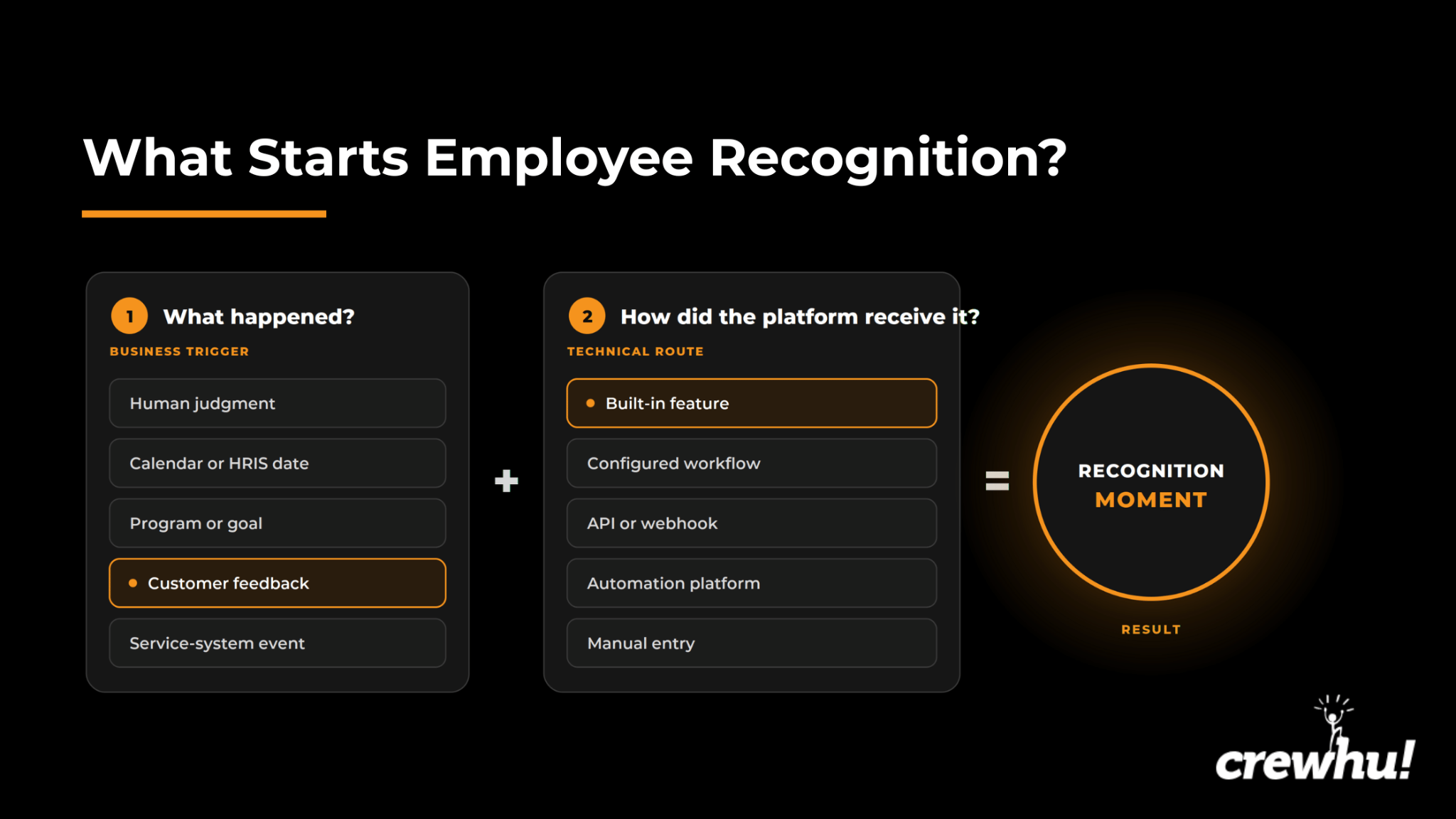
The same contribution can reach recognition through different technical routes. A product page that lists Jira, Zendesk, Salesforce, or Workday doesn't establish what the integration does. Ask which object or event starts the workflow, what data moves, how the employee is identified, and what happens when the automation fails.
3. Verify who can participate
Desk-based employees may prefer Slack, Teams, Outlook, SharePoint, or an intranet. But frontline and field employees need mobile apps, SMS, QR codes, printed material, shared displays, or manager-assisted delivery.
Check who can send and receive recognition, approve and redeem an award, see the recognition feed, administer budgets, view reporting, and participate without a company email address.
Access and trigger depth solve different problems. A mobile app can deliver recognition to an employee in the field but doesn't identify the completed job or customer response that earned it. Test the employee experience on the devices, accounts, and channels the workforce uses.
4. Inspect reward funding and governance
Ask how the platform handles smaller but critical details like:
- Points and allowances
- Manager budgets and approvals
- Prepaid balances and deposits
- Payment and card fees
- Markups
- Expiration and unclaimed rewards
- Refunds after cancellation
- Countries and currencies
- Company-provided rewards
- Reporting by team, location, or program
A broad catalog can accommodate an international workforce, but don’t expect it to fix vague criteria, uneven manager participation, poor access, or a funding model employees don't understand.
The Incentive Research Foundation found that timely, sincere, and accessible recognition matter more than reward value alone. Tangible rewards add weight when they’re relevant and proportionate to the contribution. That shifts the evaluation from catalog size toward relevant characteristics like employee access, redemption friction, geographic coverage, and the logic connecting the reward to the work.
Test the exception path as well. Ask what happens when an item arrives damaged, a gift card is unavailable in an employee's country, a redemption fails, or a departing employee still holds points.
5. Test integrations and retained context
An integration preserves the information behind each contribution. That context may include:
- Employee, manager, and customer names
- Account, ticket, project, or job
- Location
- Issue
- Metric
- Survey response or recognition source
- Company value
Ask the provider to show the event, fields, direction, approval path and error handling, timing and mapping, and permissions. A directory sync keeps employee data current. A work event that creates an award is a different integration. Both have a role but address different issues.
6. Require a demonstration of the real workflow
A demo should follow your systems and operating conditions. Ask every shortlisted provider to show:
- An event that starts recognition
- How the employee or team is identified
- The message a recipient sees
- Whether approval is required
- How points or reward value are assigned
- How budgets and exceptions are handled
- Where recognition appears
- What managers and administrators can report
- Which package and integrations are required
For a customer-feedback use case, follow a real response from collection to employee credit and recognition. For a Jira, CRM, or help-desk example, use the actual status and field structure. For a frontline case, ask an employee to complete the flow through the device and channel they would use at work.
How much employee recognition software actually costs
The cost of employee recognition software extends beyond the subscription shown on the pricing page. A realistic annual estimate combines software access, reward funding, implementation and integrations, and ongoing administration.
Software access
Identify the commercial unit first. Depending on the provider's pricing model, it may cover every employee or user, active employees, separate senders and recipients, selected modules, a minimum annual contract, or a custom enterprise package. Ask quote-led companies for a line-item explanation of the employee count, modules, support, contract period, and usage assumptions behind the proposal.
Reward funding
Funding models create different cash-flow and administration requirements even when subscriptions look similar. Be sure yours includes:
- Peer and manager allowances
- Milestone awards
- Formal nominations and incentives
- Prepaid balances, security deposits, and processing and card fees
- International transfers and catalog markups
- Physical delivery
- Unused funds
Implementation and integrations
Account for onboarding and training (including employee data setup), HRIS and SSO configuration, collaboration tool setup, API or automation work, premium connectors, testing, and professional services. A configured Zendesk workflow is commercially different from an included Slack integration. Ask who builds it, who maintains it, and what happens when fields or business rules change.
Ongoing operation and switching
Include the internal time required to manage the program, support managers, adjust budgets, reconcile rewards, produce reports, and answer employee questions. Also account for renewal reviews, data exports, and rebuilding automations after a switch.
Ask each provider for low-, expected-, and high-usage annual scenarios based on the same employee count, countries, reward budget, integrations, support assumptions, and contract period. The lowest subscription won't necessarily create the lowest operating cost, but a broad suite also won't justify its price when most of its capabilities remain unused.
How to keep an employee recognition program useful after launch
Recognition software makes appreciation easier to give, see, and report. But it’s still the organization’s responsibility to define what deserves recognition and keep the program active after the initial launch. That entails:
- Name one internal owner: Designate one person to coordinate recognition criteria and reward rules, budgets, managerial training, employee communication, triggers and integrations, and reporting.
- Give managers concrete examples: "Recognize great work," leaves too much room for inconsistency. A service team needs use cases like a clear handoff, calm recovery, useful documentation, a proactive customer update, or praise connected to a specific employee.
- Analyze reporting to uncover participation gaps: An organization-wide participation rate can look healthy while some employees’ work remains unseen. Review activity by manager, team, shift, location, and recognition type to find those gaps and decide what to address next. A low-use team may need easier access, clearer criteria, a conversation with the team’s manager, or renewed training.
In the Motivation Insiders podcast episode “Employee Recognition Best Practice Across the Generations,” host Paul Nolan, editor of Sales & Marketing Management, speaks with Beril McManus, director of team member engagement at American Airlines. During their discussion, the two talk about how the airline uses participation data to decide where managerial support is needed.
McManus describes identifying managers who rarely recognize team members, pinpointing what’s getting in the way, and following up with support, training, and examples from other leaders. Buyers need to feel confident that the platform can uncover those gaps at the managerial level and give program owners enough detail to respond.
During the first 90 days, track employee and manager participation, recognition source and frequency, reward redemptions, and budgetary use. You should also monitor recognized values or behaviors, activity across teams and locations, administrative time, and employee feedback about the program.
Recognition quality deserves the same attention as participation. Determine whether recognition is timely, specific enough to show why the contribution mattered, and reaches employees whose work may be less visible. Track quality and reach alongside platform activity. Then read those signals in the context of the wider conditions covered in both an employee engagement strategy and an employee retention strategy, including pay, workload, growth opportunities, manager quality, trust, and working conditions.
Service businesses should then compare recognition patterns with customer feedback, documentation, handoff quality, service recovery, and operational measures they already monitor. Review the program after 30, 60, and 90 days, looking for patterns by team, manager, location, recognition source, and type of work. Potential issues to address include fixing any access problems, removing weak rules, refreshing manager training, adjusting reward logic, and identifying valuable work that’s still being missed.
Choose the platform that fits the recognition job
Don’t think the longest feature equates to the best employee recognition software fit. A better test is whether the platform can recognize the right contribution, reach the workforce, preserve the context your business needs, and support a program the organization can afford and operate.
Crewhu ranks first for service businesses that want to connect recognition to customer feedback and service-system activity. Its PSA and help desk workflows make it a great fit especially for MSPs, while the same model gives other service teams a practical way to keep recognition close to the work that earned it.
To see firsthand why we’re so confident, book a Crewhu demo today. You can test your own workflow starting from the service event to employee credit, recognition, rewards, and reporting.
FAQs
What is employee recognition software?
Employee recognition software helps organizations acknowledge employee contributions through peer praise, manager awards, milestones, nominations, points, rewards, reporting, and workplace integrations. Products differ in the work they recognize, the employees they reach, the events that trigger recognition, and the administration required to run the program.
How much does employee recognition software cost?
Costs range from free plans and low, per-user subscriptions to enterprise contracts worth tens or hundreds of thousands of dollars a year. Reward funding, deposits, implementation, integrations, payment fees, international delivery, training, and internal administration sit outside the base subscription and need to be added into the total cost of ownership.
Can recognition software improve employee engagement and retention?
Recognition software can make appreciation more visible, timely, and consistent. But the size of its impact depends on recognition quality, manager participation, employee access, and the broader working environment (i.e., company culture). Pay, workload, growth, trust, and manager quality still influence engagement and retention.
What integrations matter most?
The most relevant integrations support a company’s intended recognition process. That may include an HRIS for employee data, collaboration tools for participation, or a ticketing, CRM, project, survey, or operating system for recognition triggers. Confirm your event and data transferred before anything else. An integration logo alone doesn't establish the workflow.
Can employee recognition be automated?
Yes. Birthdays, work anniversaries, customer responses, goals, completed tickets, project milestones, and other work-related events can trigger or prompt recognition from your software. The route may be built into the product, configured inside it, connected through an API or automation service, or dependent on manual action. Automation ensures no one in the company gets left out.
How should a company measure whether the program is working?
Track participation, manager usage, recognition frequency, timeliness, reward redemption, budget use, administrative work, recognition quality, and reach across the workforce. Employee feedback and relevant customer or service measures add crucial context to those numbers. Compare changes against a defined starting point and the other management or operational changes made during the same period.